

Introduction to Arc XP Blocks
Arc XP Blocks provides a set of reusable page templates, UI components, and content blocks that come out-of-the-box with your Arc XP bundle. By using Arc XP Blocks, you get the following benefits:
- Use a quick-launch tool kit of customizable components, blocks, and page templates.
- Receive components and blocks updates by deploying the latest Themes version release.
- Get full Arc XP support while using Arc XP Blocks.
See the Arc XP Blocks repositories:
Arc XP Blocks Arc XP ComponentsSupported browsers
Arc XP Blocks are supported on the two most recent versions of the following browsers:
- Google Chrome (desktop and Android)
- Microsoft Edge
- Mozilla Firefox (desktop and Android)
- Safari (macOS and iOS)
Other Chromium-based browsers, such as Opera and Samsung Internet, are also supported.
How Arc XP Blocks work
Your Arc XP bundle includes a list of components and blocks in the blocks.json file. You can control the components and blocks available in your bundle by making changes to this file locally and redeploying your bundle. For more details, see Local development process for custom blocks.
Requirements
When building and deploying a bundle, PageBuilder Engine validates the following requirements before making Arc XP Blocks available on your website:
blocks.jsonfile with valid settings in the root directory of your project.arc-themes-componentspackage dependency in your project.- Environment variables and personal access tokens.
- Version compatibility between PageBuilder Engine and
themesReleaseVersion.
Usage
Once you have set up Arc XP Blocks in your bundle, they become available in PageBuilder Editor, where you can select them and add them to your pages. Using the PageBuilder Editor UI, you can configure the Arc XP Blocks parameters through the Custom Fields section:
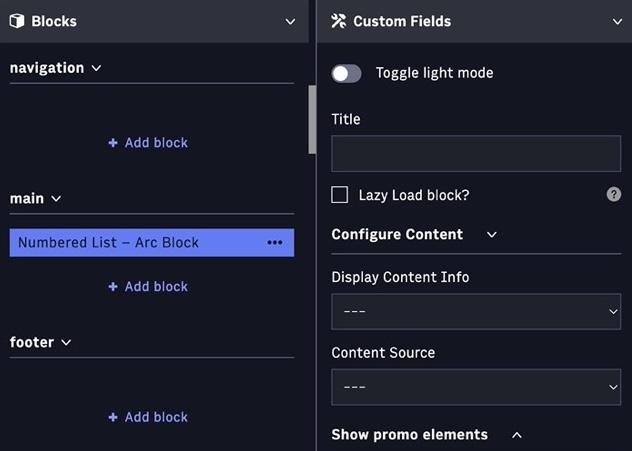
Styling customization
Arc XP Blocks uses a design system that enables you to customize block styling without ejecting (forking) a block. The Themes design system is based on global tokens, breakpoints, and alias tokens, and leverages CSS logical properties. For more details on how to customize blocks styling, see:
Custom blocks
To create your custom blocks and use Arc XP Blocks as a starting point, you must eject (fork) the Arc XP block. See:
To create a custom block from the start and use the Themes design system, see Creating a custom block with styling.