

Arc XP Subscriptions - Active Subscription Renewal Offboarding Migration
When clients move subscriptions off Arc XP, most of the migration is self-service via extracts — except payment gateway tokens, which Arc XP must extract on the client’s behalf. This guide covers the timeline, process, and responsibilities for offboarding.
Responsibility matrix
| Step | Customer | Arc XP | New vendor |
|---|---|---|---|
| Support process | Submit all migration questions through ACS tickets. | Respond per SLA. | Respond per SLA. |
| Confirm migration plans | Confirm process and timeline with the new vendor. Submit any feature requests at least 90 days before the deadline. | Review client requests; confirm what can be accommodated and when. | Collaborate with the customer; share any vendor-specific procedures. |
| New subscriptions switch-over | Update site flows to use the new vendor’s APIs and checkout. Remove all Arc checkouts. | — | Implement the new-subscription changes on the customer’s site. |
| Active subscription & renewal payment migration | Run Subscription and Financial extracts. Map Arc price codes and start dates to the new vendor’s pricing. | Provide Subscription and Financial extracts and the pricing-schedule API. | Map Arc price codes to new-vendor pricing with the customer. |
| Payment gateway token extract | Open an ACS ticket 3 weeks ahead; specify the run date; stop new subscriptions in Arc XP first. | Run and deliver the token extract for active subscriptions. | Confirm there is no rollback once tokens are loaded and renewals are turned on. |
| Data retention & cleanup | Download and save data needed for financial and tax records. | Remove all financial and subscription data when the Sales contract ends. | — |
Timeline & flow
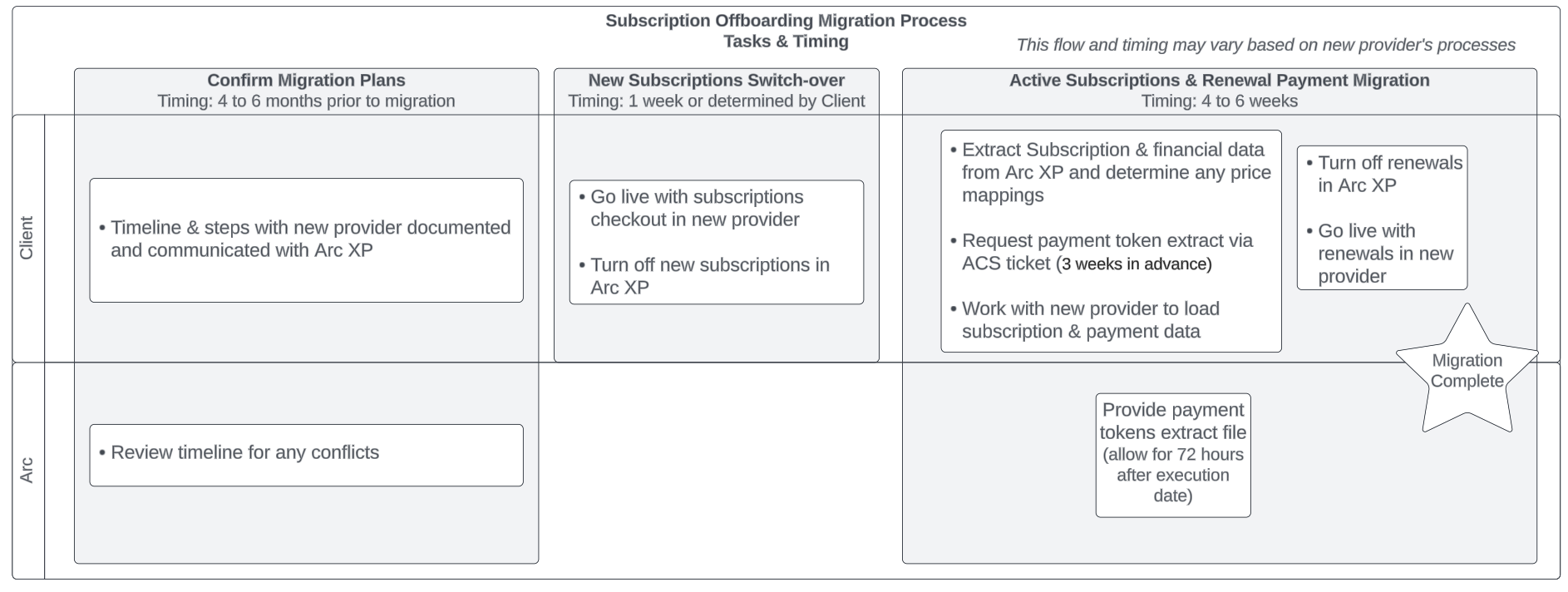
Timing and steps are confirmed with the new vendor. The flow below is a general guide for the key migration steps; it is not a complete checklist, since many procedures depend on the new vendor.
Support process
Submit all questions about the migration process and running extracts through ACS tickets.
Confirm migration plans
Confirm the timeline and process with the new vendor — they will have unique procedures. Arc XP will review the timeline for conflicts.
New subscriptions migration
You can switch over new subscriptions at any time. Update site user flows to use the new vendor’s APIs and checkout, and remove all Arc checkouts.
Active subscription & renewal payment migration
Most of this work is self-service via extracts. The Subscription and Financial extracts cover all subscription information and most payment information. The only data you cannot extract yourself is the subscription payment tokens — Arc XP provides those as a CSV containing the subscription ID, payment partner, and token current at the time of the extract.
Migrating subscription data
Use the Subscription and Financial extracts to download data in a single pass. See the data extraction framework documentation for details.
Subscription extract
- Lists both paid and non-paid subscriptions. All have SKUs; only paid subscriptions have price codes.
- To get the pricing schedule for each subscription, call:
GET /retail/api/v1/pricing/cycle/:priceCode/:cycleIndex/:startDate
- Map Arc’s price codes and subscription start dates to the new vendor’s pricing structures.
Financial extract
- Provides past financial transactions for subscriptions, including payments, refunds, and amortization data.
- Correlate subscriptions and financial transactions using the subscription ID, which appears in both extracts.
Requesting a payment gateway token extract
Arc XP provides tokens only for subscriptions that are active at the time of the extract — that is, only tokens the client could use in the future. Terminated subscriptions do not have an associated token. Time the extract carefully so renewals do not overlap in both systems.
To request the extract:
- Open an ACS support ticket requesting a Subscriptions Payment Token migration extract from the Subscriptions team. Submit the ticket 3 weeks before the manual query needs to be executed, and allow 72 hours after execution for results.
- Provide the date the report should be executed. Turn off new subscriptions and renewals in Arc XP before this date to avoid duplicated data.
- The report is delivered as a CSV containing the subscription ID, payment partner, and token current at the time of the extract.
- Arc XP Customer Support will receive and distribute the report.