

How to use BlueConic with the Arc XP Paywall
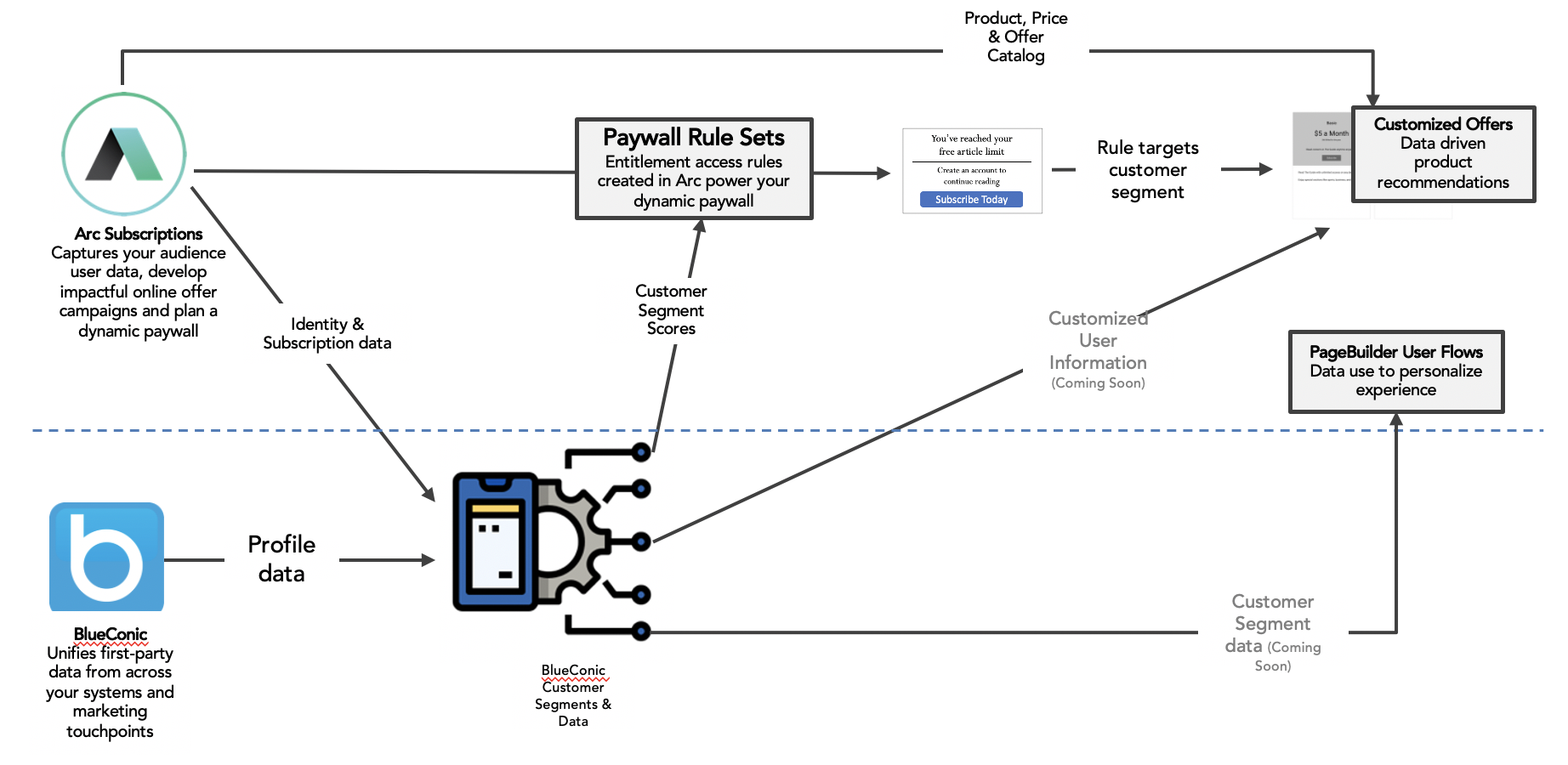
This guide is for developers and marketers integrating a BlueConic CDP account with the Arc XP Paywall. By combining BlueConic’s first-party audience data with Arc XP Subscriptions’ rule engine, you can target paywall experiences to the segments that matter most to your business.
The integration uses the Arc XP CDP Connector, which is provider-agnostic. This page covers what you do on the BlueConic side and how to wire BlueConic’s JavaScript API to the paywall at runtime. For the paywall-side configuration (registering segments and building rules), see CDP and the Arc XP Paywall.
Prerequisites
- A configured Arc XP Paywall. See Developer guide to setting up a paywall.
- A BlueConic account with permission to create segments and edit listeners.
- The BlueConic JavaScript front-end is loaded on your pages. See BlueConic JavaScript Front-End API.
How the integration works
- You define audience segments in BlueConic based on profile properties or behavior.
- You register each segment in the Arc XP CDP User Segments settings with the BlueConic segment ID as its value.
- You attach those segments to paywall rules using Audience Criteria → User Segment.
- At runtime, your site reads the visitor’s current BlueConic segments from
window.blueConicClientand passes them toArcP.run. The paywall evaluates rules against that list.
Step 1: Create segments in BlueConic
Create the segments you want to target in BlueConic. A segment groups visitors based on profile properties, behavior, or membership in other segments — for example, “Engaged Reader”, “Morning Visitor”, or “Interested in Politics”.
For details, see:
Note the segment ID for each segment you plan to use in paywall rules. You will use this ID as the Value when you register the segment in Arc XP.
Step 2: Register the segments in Arc XP
In the Arc XP Settings Admin, open CDP User Segments and add an entry for each BlueConic segment:
- Value — the BlueConic segment ID (for example,
engaged_reader). This must match exactly what BlueConic returns at runtime. - Name — a human-readable label that appears in the paywall rule builder (for example,
Engaged Reader).
Step 3: Attach segments to paywall rules
In the paywall rule builder, set Audience Criteria → User Segment and pick one or more of the segments you registered in Step 2. A rule can target multiple segments.
Full details on rule configuration are in the CDP and the Arc XP Paywall guide.
Step 4: Pass BlueConic segments to the paywall at runtime
When you call ArcP.run, supply the visitor’s current BlueConic segments via userSegments (a static array) or customSegmentCheck (an async function that resolves to an array). The values must match the Value field you set in Step 2.
The example below reads the visitor’s segments from the BlueConic JS API and passes them to the paywall:
async function getBlueConicSegments() {  return new Promise((resolve) => {    if (!window.blueConicClient?.event?.subscribe) {      resolve([]);      return;    }
    window.blueConicClient.event.subscribe('onupdated', null, () => {      const segments = window.blueConicClient.profile        .getProfile()        .getSegments()        .map((segment) => segment.getId());      resolve(segments);    });  });}
ArcP.run({ customSegmentCheck: getBlueConicSegments });Avoiding duplicate BlueConic profiles for the same user
BlueConic creates a new anonymous profile (BCSessionID) every time an anonymous session starts — including after logout or session expiration. Without a merge strategy, the same Arc identity user can accumulate multiple BlueConic profiles, splitting their behavior data across them.
To consolidate profiles for logged-in users:
- Store a stable Arc identity value (for example, the user’s UUID) as a BlueConic profile property using a BlueConic listener that fires on login.
- Configure a merge rule in BlueConic settings that merges profiles sharing that property.
This ensures each Arc identity user maps to a single BlueConic profile across sessions.
You can also reset the BlueConic profile on logout to avoid carrying authenticated behavior into a new anonymous session:
window.addEventListener('ArcSDK.logout', () => { window.blueConicClient?.profile?.createProfile();});