

Updating Active Subscriptions
Subscription strategy often requires changing what an active subscriber pays — to upsell to a higher tier, save a churning customer with a downgrade, or roll out a market-wide price increase. Arc XP supports these changes in three ways:
- Customer Service admin — used by your representatives for one-off retention or pricing changes.
- Public APIs — used to build customer-facing upgrade and save flows that change the product or price immediately, with an automatic refund and new charge.
- Developer APIs — used to schedule individual or bulk price changes that take effect at the next renewal cycle.
Endpoint summary
| Endpoint | Used by | Effect | Purpose |
|---|---|---|---|
InitializePriceUpdate | Customer-facing site | Immediate | Calculate the refund and new charge for a price/product change. |
FinalizePriceUpdate | Customer-facing site | Immediate | Execute the change calculated by InitializePriceUpdate. |
PUT …/sales/api/v1/subscription/{id}/pricechange | Server-to-server | Next renewal after effectiveDate | Schedule a price change on a single subscription. |
POST …/sales/api/v1/batchpricechange | Server-to-server | Next renewal after effectiveDate | Schedule price changes across many subscriptions. |
Customer Service admin subscription changes
At times your customer service agents will want to update a reader’s subscription as a retention effort or as part of a larger pricing strategy change. Changes to a single subscriber’s product or price can be made in the Customer Support Portal on the active subscription screen.
Website subscription changes
A key part of a subscription product strategy is helping customers upgrade to a higher tier. Two public APIs can be used to build a flow that changes a customer’s active subscription and grants them immediate entitlement. These APIs can also power a “save” flow that downgrades a product or price. As part of the change, the APIs refund any remaining balance and then charge the customer for the new subscription terms.
-
InitializePriceUpdate— Validates the change and calculates the refund amount and new charge based on the Subscription ID and Price Code passed in. The response includes:{"initializedId": "793cdad9-231e-4579-a3f0-3b5ace6f8c19","refundAmount": 12.3,"chargeAmount": 33.2,"taxAmount": 3.2,"refundAmountMin": 10.0,"chargeAmountMin": 10.0,"refundAmountMet": true,"chargeAmountMet": true,"sameRenewalterms": true,"nextRenewalDateUTC": "2018-06-22T15:27:43.606Z"} -
FinalizePriceUpdate— Executes the change using the refund and charge amounts already calculated, based on the Subscription ID and theinitializedIdreturned byInitializePriceUpdate. The response includes:{"subscriptionID": 123,"productSKU": "SKU","productName": "productName","priceCode": "PRI001","nextEventDateUTC": "2018-06-22T15:27:43.606Z"}
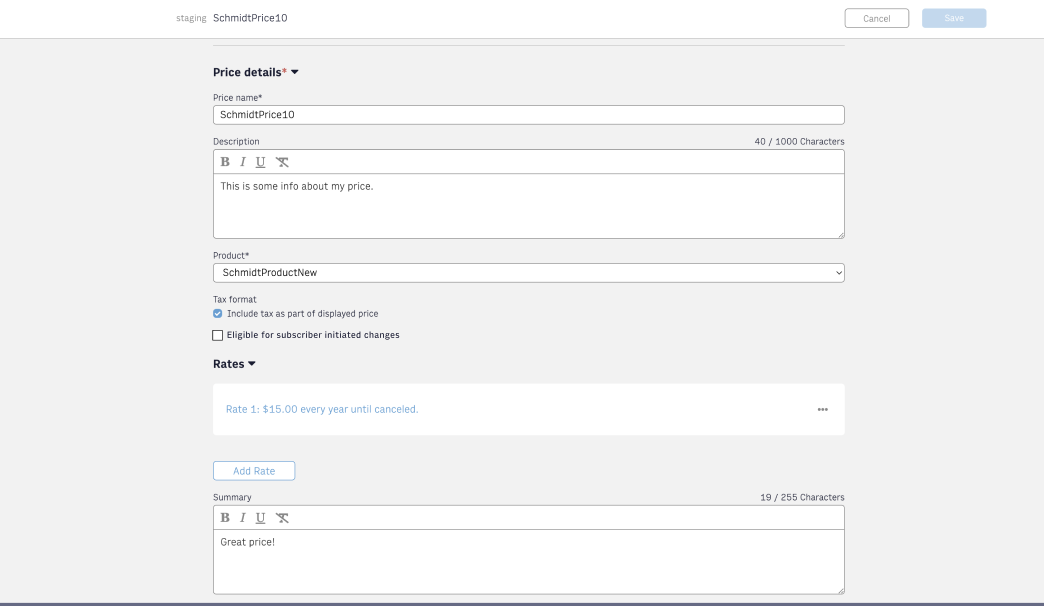
For a Price Code to be eligible for an end-user-driven change, it must be marked change eligible on the Price details screen. This can be done for any Price, including Prices that are part of a Published offer.
An example flow for an upgrade path can be found in the Developers guide to setting up a Paywall.
The calculation for the next renewal date, refund amount, and new charge depends on the type of change:
- Same renewal terms — e.g. monthly to monthly, yearly to yearly.
- Different renewal terms — e.g. monthly to yearly, yearly to weekly, or any change in the number of days/weeks (30 days → 10 days, 2 weeks → 4 weeks).
For more on the underlying behavior, see Change price for subscription.
Server-to-server and bulk subscription changes
Pricing strategy needs to adjust with the market. Pricing tiers give flexibility for short-term promotional rates, but wider strategy updates require additional tools. Two API endpoints let clients run individual or bulk price changes — updating a single subscription by Subscription ID, or updating many subscriptions at once by Product and start date.
Individual subscriptions
PUT …/sales/api/v1/subscription/{id}/pricechangeupdates the product and price for the specified Subscription ID.- A future
effectiveDateis required and determines when the price change is processed. The change goes into effect on the first renewal after this date. - The Product SKU and Price Code set the new price rate. The Price must be added and linked to the Product before the change can be applied.
- The initial price rate cycle index is
0. If no cycle is provided, index0is used. Use1for the second tier,2for the third, and so on.
This API lets clients integrate with propensity systems that select subscribers most likely to accept a price increase.
Bulk updates
POST …/sales/api/v1/batchpricechangeupdates the product and price for many subscriptions at once, based on their current Product, current Price, and start date. This is useful for updating all customers who have been on a specific product for a given length of time.- The Started Before Date, from SKU, and from Price Code determine which subscriptions are impacted.
- The Product SKU and Price Code must be associated for the change to process.
- A future
effectiveDateis required and determines when each price change is processed. Each change goes into effect on its subscription’s first renewal after this date. - The To Product SKU and To Price Code set the new subscription details. The Price must be added and linked to the Product before the change can be applied.
- The initial price rate cycle index is
0. If no cycle is provided, index0is used. Use1for the second tier,2for the third, and so on.
Client communication
Three WebSocket events are sent at different points when a price change is scheduled:
- Price Change Scheduled
- Upcoming Price Change — sent 14 days before the price change.
- Update SKU PriceCode
Use these to notify customers about the pending change. See Listening to Arc events using WebSockets.
Considerations
- Price changes only apply to paid subscriptions. Cancelled, terminated, free, and linked subscriptions cannot have a price change. Only an active or suspended subscription can.
- The new price must be greater than or equal to zero. Note: PayPal does not accept zero-dollar price change renewals.
- When several changes are scheduled against the same price, they are queued and applied in order. The only way to remove values from this queue is via Private APIs.
- A bulk price change only affects subscriptions that exist at the time the change is requested.
For more details on these APIs, see Subscriptions APIs.
Refund calculations for subscription changes
When an active product or price is updated in the Customer Service admin and the change takes effect immediately, the customer may need a refund for the remaining balance. More details on Customer Service admin functionality are in the How to use customer service admin in Arc XP subscriptions guide, under the Subscriptions section.
The system suggests a prorated refund based on the amount paid during the current billing cycle, taking any prior refunds into account. If the subscription is in the middle of a payment cycle, the suggestion uses the calculation below. Tax is included in all calculations and all time calculations are accurate to the millisecond.
suggestedRefund = lastPaymentAmount * (remainingTimeOnCurrentCycle / totalTimeCurrentCycle)
After the refund and new charge, the subscription continues on the new price terms. The next charge happens on the new schedule.