

Compass API Developer Guide
Introduction
This guide covers Arc XP’s Recommendations API, which delivers personalized content recommendations for your audience by learning from user behavior and your content catalog.
It is built to work with any Customer Data Platform (CDP) and any Content Management System (CMS), and deliver content recommendations on any content surface.
Arc XP Compass is a personalization backend that connects your content catalog and audience behavior to a machine learning engine.
It provides two APIs:
| API | Purpose | Base Path |
|---|---|---|
| Collector API | Send user behavior events and content updates | /collector/v1 |
| Recommendations API | Retrieve personalized content recommendations | /recommend/v1 |
The Collector API accepts behavioral signals (page views, clicks, engagement) and content lifecycle events (publish, delete) from your applications (via your CDP) and CMS.
The Recommendations API is a read-only API that returns a ranked, personalized list for a given user. Each item carries a display-ready card, so a single call returns everything needed to render — no separate content lookup required.
Each tenant (organization) operates with a fully isolated recommendation model. Your content, your audience data, and your trained model are never shared with other tenants.
Base URL
Both APIs are served from:
https://{org}-config-prod.api.arc-cdn.net/Replace {org} with your organization identifier; the config and prod
segments are fixed. The path prefix selects the backend — /collector/v1 for
the Collector API and /recommend/v1 for the Recommendations API — appended to
this host.
How it works
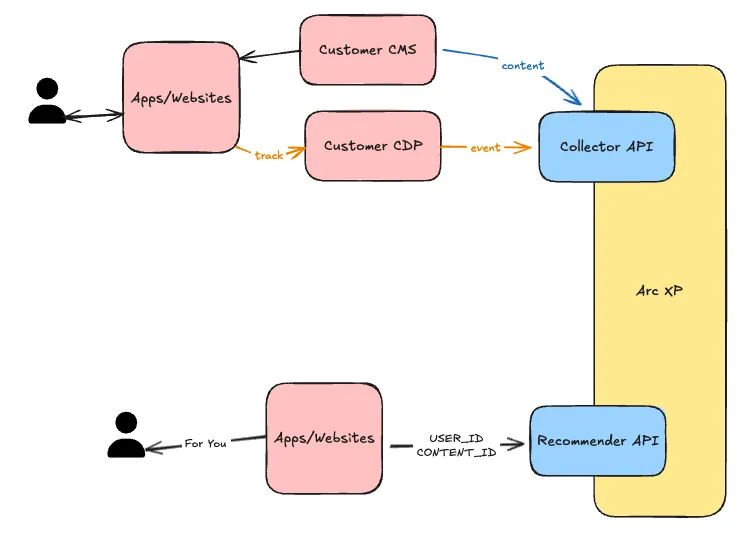
- You send content data in — Your CMS sends content updates via webhooks. For Arc XP customers, this is accomplished via IFX.
- Your apps send user behavior events (page views, clicks, engagement) — either with the first-party Compass Web SDK for web traffic, or by forwarding them from a CDP or server-side source. See Choosing how to collect behavioral events to choose.
- Compass learns — The ML engine trains a personalization model on your content catalog and your audience’s behavior.
- You fetch recommendations out — Your applications call the Recommendations API to get ranked content for a specific user.
Choosing how to collect behavioral events
Every integration has the same three moving parts, and only one of them varies:
- Content catalog sync — your CMS keeps the recommender’s catalog current by posting publish, update, and delete events to the Content endpoint (
POST /collector/v1/content). Arc XP CMS customers wire this up with the IFX Recipe. This is the same regardless of how you collect behavioral events. - Behavioral event collection — your site sends reader interactions (page views, clicks, scroll depth) to the event collector. This is the part with two options, covered below.
- Recommendations read — your applications call
GET /recommend/v1/recommendationsto fetch a ranked, display-ready list for a user. Also the same regardless of how you collect behavioral events. (This is the direct API read path. The SDK-rendered recommendation components are the exception to the route, not the data: they read the same recommendations through the Arc Experiences edge at/experiences/recommend/v1rather than calling/recommend/v1themselves — same model and data, different route. The Catch Up card is a separate Experience: it reads a followed-storylines “catch-up” payload from a different endpoint (/experiences/storyline/v1), and only its optional caught-up-screen suggestions use the recommendations route. Both are authenticated by the browser SDK’scollect-webtoken. See Authentication and tokens.)
Both collection options feed the same model and, for direct API callers, the same /recommend/v1 read path — the choice is about where your behavioral signal comes from and how much you want to build.
| Compass Web SDK | CDP / server-side forwarder | |
|---|---|---|
| What it is | Arc XP’s first-party client-side JavaScript library (@arcxp/compass-sdk, global ArcCompass) you embed in your web pages | A translation you write on your side that maps your event source onto the event envelope and POSTs it |
| How events are sent | The SDK captures and posts events for you | You POST events yourself |
| Collector endpoint | collect-web/v1/events/batch (browser events collector) | collector/v1/events (server-side Collector API) |
| Reach | Browser only | Any source — server-side, native apps, OTT, backfill |
| Built in | Automatic page_view capture (incl. SPA routes), consent gate, identity + session management, batching, retry | You own batching, retry, identity stability, and consent filtering |
| Effort | Paste a snippet, call init(), resolve consent — roughly one hour | Build (or template) a forwarder against your source |
Use the Compass Web SDK when your behavioral signal is primarily web/browser traffic, you don’t already forward events from a CDP, and you want the fastest integration with batching and retries handled for you. Go to the Compass Web SDK: Integration Guide.
Use a CDP / server-side forwarder when events originate server-side or from non-web surfaces (native apps, OTT), you already operate a CDP (BlueConic, Amplitude, Adobe Real-Time CDP, Tealium, Permutive, ActionIQ, and similar), you need historical backfill, or you want a single server-side pipeline of record. Go to Backfilling and Forwarding Data to the Collector.
Use both when it helps — the two paths are not mutually exclusive. A common pattern runs the Compass Web SDK for live web traffic and a forwarder for historical backfill or non-web surfaces. When you combine them, keep the join keys consistent: send the same anonymized user_id for the same reader and the same item_id for the same content across both paths, or the model treats the two streams as unrelated. See the ID Guidance.
Authentication and tokens
Every Content Recommendations API is headless and authenticates with a
Headless API token passed in the X-API-Key request header on every request:
X-API-Key: <your-token>Headless API tokens are separate from Developer Center tokens. Both the Collector API and Recommendations API require a Headless API token passed in the X-API-Key header. This section is the single reference for which token each surface needs, how to provision them, and how to handle them safely.
One token per API surface
Provision a separate token for each API you use, each assigned to its own key collection:
| Key collection | Authenticates | Used by | Where it may live |
|---|---|---|---|
| recommend | GET /recommend/v1/* (read-only) | Your front-end, the recommendations block, email senders | Browser-safe. It can only read recommendations, so it may ship in page JavaScript. |
| collector | POST /collector/v1/* (events and content writes) | Your CMS webhook, the IFX bundle, CDP/server-side forwarders, bulk loads | Server-side only. It writes to your catalog and training data — it must never appear in a browser bundle. |
| collect-web (browser events) | POST /collect-web/v1/events/batch, plus the SDK-rendered Experiences’ recommendation reads at GET /experiences/* | The Compass Web SDK | Browser-safe. It posts browser events and authenticates the SDK’s Experience reads, but cannot reach the content catalog. |
Assigning each token to its own key collection means a token exposed in one context cannot be used against another API. The recommend and collect-web keys are public by design (anyone can read them out of your page source), and their collections limit the blast radius of that exposure to read-only recommendations or event submission. The collector key has no such containment — treat it like any other server-side secret.
Provisioning
Tokens are provisioned through the Delivery API. The full flow — generating a bootstrap Developer Center token, creating Headless API tokens via POST /v1/access/keys, and assigning them to key collections — is documented in Provisioning tokens through Delivery API.
Limits to plan around:
- Tokens are limited to 30 per environment (Sandbox and Production).
- Tokens are created one at a time.
- Deletion via
DELETE /v1/access/keys/{key_id}also operates on a single token at a time.
Handling rules
- Never commit tokens to source control. Store them in your secrets manager and inject them at deploy time (for the IFX bundle, as integration secrets in Developer Center).
- Rotate tokens on whatever cadence your security policy requires.
- Remove tokens that are no longer in use. The 30-token-per-environment limit is easy to hit if old tokens linger.
- Keep one token per consumer where practical. A dedicated token per integration (block, IFX bundle, forwarder, bulk-load job) makes rotation and revocation surgical instead of site-wide.
Verifying a token
Confirm a recommend key is accepted:
curl -i -H "X-API-Key: <recommend-key>" \ "https://{org}-config-prod.api.arc-cdn.net/recommend/v1/recommendations?site_id=<site_id>&user_id=test-user"The status code you get back depends on both the key and your tenant lifecycle status together with whether your catalog has content yet — a valid key does not by itself guarantee a 200:
401— the key is missing, unknown, or not assigned to the right key collection. Decided before any catalog lookup.403(Cache-Control: no-store), body{"detail":"Tenant is not active"}— the key is valid, but the tenant is not servable (onboarding with no content yet, or suspended/pending/deleted).200— the key is accepted. This includes an all-0.0recency preview and an emptyrecommendations: [], both of which are success. See Cold-start response states for the full breakdown.
So an empty array or an all-0.0 preview still means the key works; only 401 and 403 indicate a problem to fix. The same check applies to the collector key against POST /collector/v1/events, which returns 202 Accepted when the key and payload are valid.
Critical requirements
These rules are non-negotiable. Violating them will either corrupt your recommendation model, leak sensitive data, or silently produce bad results.
-
Never send PII as the user identifier.
user_idmust be an anonymized, stable token — hash or pseudonymize before sending, because Arc XP does not sanitize user IDs on ingestion. See the User ID Guidance for the full rules. -
Keep the content catalog in sync. Only send published content via the Content endpoint, and send an
action: "delete"payload the moment an item is unpublished or deleted in your CMS. Stale content in the model leads to recommendations pointing at dead pages. -
Use the same identifier for content and events. The
item_idon every content item and theitem_idon every interaction event must refer to the same, stable identifier — if they don’t match, the event cannot contribute to recommendations. See the Item ID Guidance for the full rules on stability, formatting, republish, and takedowns. -
Do not send synthetic or test traffic against real
site_idvalues. Load tests, QA scripts, and bot traffic poison the training signal and degrade recommendation quality for real users. Scope any test activity to a dedicated, non-productionsite_id. -
Exclude internal employee traffic. Events from your own staff — editors QA-ing articles, newsroom staff browsing stories, engineers exercising the site — skew the behavioral signal away from real reader interests and degrade recommendation quality. Filter employee sessions out before sending to the Events endpoint.
-
Exclude bot and crawler traffic. Search crawlers, scrapers, and other automated agents do not represent real reader interest, and their access patterns (exhaustive crawls, repeated hits, no engagement depth) distort the training signal. Filter known bots out before sending to the Events endpoint.
-
There is no separate Sandbox or Production instance for Compass — you get a single instance. Anything you send is training the one model that serves your live traffic. Plan your testing, seeding, and rollout accordingly, and use a dedicated test
site_idto keep experimental data out of your production catalog. -
Handle Headless API tokens carefully. Never commit them to source control, and keep each API’s token in its own key collection — see Authentication and tokens above for the handling rules.
Quick Start (5 minutes)
The shortest path from zero to your first recommendation:
-
Provision Headless API tokens — one for the Collector API and one for the Recommendations API, following Authentication and tokens. Pass the appropriate token in the
X-API-Keyheader on each request below. -
Send content —
POST /collector/v1/contentwith anaction: "publish"payload for each item in your catalog. This seeds the model with what’s available to recommend.POST /collector/v1/content{ "action": "publish", "item_id": "ARTICLE-001", "site_id": "my-site", "type": "article", "timestamp": "...", "title": "..." } -
Send events —
POST /collector/v1/eventsas users interact with that content. At least a few events per user are needed before personalization kicks in.POST /collector/v1/events{ "user_id": "user-1", "item_id": "ARTICLE-001", "event_type": "page_view", "timestamp": "..." }On a website, the Compass Web SDK captures and posts these events for you — you paste a snippet instead of hand-rolling this request. The raw
POSTshown here is what a server-side or CDP forwarder sends; it’s also the contract the SDK implements under the hood. -
Fetch recommendations —
GET /recommend/v1/recommendations?site_id=my-site&user_id=user-1returns a ranked list of recommendations, each with a display-readycardready to render.
Once this loop is in place, the remaining sections of this guide cover the full field reference and supported event types.
Collector API
Base path: /collector/v1
The Collector API accepts two types of data: user behavior events and content lifecycle events. Both are processed asynchronously — the API responds immediately with 202 Accepted and processes data in the background.
It exposes two endpoints: the Events endpoint for user interactions and the Content endpoint for content lifecycle updates.
Every request must include your Collector API Headless API token in the X-API-Key header.
Events endpoint
Send user interaction events to train the recommendation model. The more behavioral data you send, the better the recommendations become.
Endpoint: POST /collector/v1/events
Response: 202 Accepted (no body)
{ "user_id": "abc-123", "item_id": "ZSGXFR2KNFCMPN3VHPWQR3BGCE", "event_type": "page_view", "timestamp": "2026-03-27T14:30:00+00:00", "session_id": null}Fields
| Field | Type | Required | Description |
|---|---|---|---|
user_id | string | Yes | Anonymized identifier of the user who triggered the event. Can be an authenticated user ID or an ephemeral session ID for anonymous users, but it must be anonymized before sending to Arc XP. |
item_id | string | Yes | The content item the user interacted with. Must match an item_id previously sent via the content endpoint. |
event_type | string | Yes | The type of interaction. See Supported Event Types. |
timestamp | string (ISO 8601) | Yes | When the interaction occurred. Must include timezone information (e.g., +00:00 or Z). |
session_id | string | No | Session identifier for grouping interactions within a single user visit. |
event_value | number | Depends on event_type | Magnitude of the interaction, as a ratio from 0.0 to 1.0 inclusive. Whether it is required, optional, or rejected depends on event_type — see Supported Event Types. A value outside that range is rejected with a 422. |
event_id | string | No | De-duplication key. If omitted, the Collector derives it deterministically from the event’s natural identity (user_id, item_id, event_type, timestamp, session_id, and any attribution ID). Omit it unless your source emits its own stable per-event ID. |
schema_version | integer | No | Leave unset. Any value other than 1 is rejected by design. |
Supported Event Types
These are the event types to send from your CDP, your server-side integration, or the Compass Web SDK. An event_type the Collector does not recognize is rejected with a 422.
The event_value column says what each type does with the event_value field:
| Value | Meaning |
|---|---|
| Required | The Collector rejects the event with a 422 if you omit event_value. |
| Optional | Send event_value when you have it. The Collector accepts the event either way. |
| Rejected | The Collector rejects the event with a 422 if you send event_value. |
| Not used | The event carries no magnitude. The Collector accepts a value here, but nothing reads it, so leave the field off. |
| Event Type | event_value | Description |
|---|---|---|
page_view | Not used | User viewed a content detail page, such as an article page. |
click | Not used | User clicked on a content link, including from recommendations modules. |
share | Not used | User shared content, such as clicked on share on Facebook. |
search | Not used | User performed an on-site search. Requires topic or keyword extraction to be relevant. |
article_save | Rejected | User saved the article to read later, such as via bookmarking. A save is binary, so the Collector rejects an article_save that carries an event_value. |
deepest_scroll | Required | The deepest point the user reached in a piece of content, sent as event_value from 0.0 to 1.0. A deepest_scroll without one records nothing, so the Collector rejects it. Send a single observation per content item per session, reporting the deepest point reached in that session rather than one event per scroll milestone. |
engaged_read | Optional | An organization-defined metric representing a reader consuming, being highly engaged with a piece of content, such as leaving a comment or spending a long time on the page. Your organization defines what counts. If your measure produces a 0.0–1.0 ratio, send it as event_value; Arc XP records it as sent and does not normalize it against other organizations. |
video_start | Not used | Video playback began. |
video_progress | Optional | Video playback reached a checkpoint. Send the fraction of the video watched so far as event_value, from 0.0 to 1.0. event_value is the only field recording how much the reader watched, so send it whenever your player reports it. The Collector accepts the event without one. |
video_complete | Not used | Video playback reached the end. |
A page view carries only the required fields:
{ "user_id": "u_314", "item_id": "a_202", "event_type": "page_view", "timestamp": "2026-04-08T10:15:00Z"}A deepest scroll carries the depth in event_value:
{ "user_id": "u_314", "item_id": "a_202", "event_type": "deepest_scroll", "event_value": 0.82, "timestamp": "2026-04-08T10:17:30Z", "session_id": "sess-a1b2c3"}Batch ingestion
For high-volume or backfill scenarios, send multiple events in a single request via POST /collector/v1/events/batch. The request body is a JSON array of the same event envelope shown above — up to 100 events per request — and the response is the same 202 Accepted with an empty body. An empty array is a no-op and also returns 202. For the authoritative schema, see POST /collector/v1/events/batch in the API reference.
Batches are all-or-nothing: if any record fails to commit, the whole batch fails, so retry the entire batch rather than individual records. The 202 reflects the asynchronous pipeline — events are durably committed before the response returns, but not yet processed end to end. Schema errors surface as 422 at the API layer; semantic errors (such as an unknown item_id) surface downstream via metrics and operational tooling.
| Status | When | Caller action |
|---|---|---|
202 | Batch was durably accepted. | None. |
422 | Body failed validation (bad enum, naive datetime, missing field). | Inspect the error pointer, fix the envelope, do not retry as-is. |
500 | Transient server-side failure committing the batch. | Retry the whole batch with exponential backoff. Surface to monitoring. |
Sizing guidance:
- Flush on volume and time. A common pattern: flush when the in-memory queue hits 50 events or 1 second has elapsed since the last flush, whichever comes first. This keeps real-time recommendations fresh during low-traffic periods.
- Backfills should pace themselves. When replaying historical logs, throttle to your tenant’s provisioned ingest throughput.
Batch is for user-behavior events only. For content / item catalog updates, use POST /collector/v1/content (see the Content endpoint).
Example — batching from a JavaScript client:
const events = [    {        user_id: "abc-123",        item_id: "ZSGXFR2KNFCMPN3VHPWQR3BGCE",        event_type: "page_view",        timestamp: "2026-03-27T14:30:00+00:00",        session_id: "sess-a1b2c3",    },    // ... up to 100 envelopes];
const res = await fetch("https://{org}-config-prod.api.arc-cdn.net/collector/v1/events/batch", {    method: "POST",    headers: {        "content-type": "application/json",        "X-API-Key": "<collector-key>",    },    body: JSON.stringify(events),});
if (res.status === 202) {    // Durably accepted. Done.} else if (res.status === 422) {    // Schema bug in the producer; do NOT retry as-is.    console.error(await res.json());} else if (res.status >= 500) {    // Transient. Retry the whole batch with backoff.}
Content endpoint
Keep your content catalog in sync with Compass. Content is sent as webhook payloads from your CMS whenever an item is published, updated, or deleted.
Endpoint: POST /collector/v1/content
Response: 202 Accepted (no body)
The request body uses a discriminated union on the action field — either "publish" (create or update) or "delete".
Publishing or Updating Content
Send this payload when a content item is first published or when it is updated.
{ "action": "publish", "item_id": "a_202", "site_id": "acme", "type": "article", "timestamp": "2026-04-08T09:00:00Z", "title": "Breaking: Major Policy Change Announced", "body": "Congress passed sweeping legislation today that... (full article prose)", "categories": ["Politics", "Government"], "tags": ["policy", "congress", "legislation"], "author": "Jane Reporter", "url": "https://acme.example.com/2026/04/08/major-policy-change/", "thumbnail_url": "https://acme.example.com/images/major-policy-change.jpg", "is_premium": false, "metadata": {}}Fields
| Field | Type | Required | Description |
|---|---|---|---|
action | string | Yes | Discriminator indicating a create/update operation. |
item_id | string | Yes | Unique identifier for this content item, typically from your CMS. |
site_id | string | Yes | Identifies which website or property this content belongs to. Used to partition recommendations by site. |
type | string | Yes | Content type: such as "article" or "podcast". |
timestamp | string (ISO 8601) | Yes | Publication date. Must include timezone. |
title | string | Yes | Display title of the content. |
body | string | No | Full readable article prose, for type: "article". Embedded and read by a language model — send clean text only. See Body & transcript text below. |
transcript | string | No | Full spoken-word text, for type: "video" and type: "podcast". Used in place of body. See Body & transcript text below. |
categories | list of strings | No | High-level taxonomy labels (e.g., "Politics", "Sports"). Defaults to empty list. |
tags | list of strings | No | Detailed keywords for the content. Defaults to empty list. |
author | string | No | Content creator name. |
url | string | No | Canonical URL of the content, used as the card’s link target. May also be supplied as metadata.url. |
thumbnail_url | string | No | URL of the content’s source image. Arc XP generates a feed-card-sized derivative from it at ingest and serves that on the card, falling back to this URL when a derivative isn’t available. May also be supplied as metadata.thumbnail_url. See Card images. |
is_premium | boolean | No | Whether this content is behind a paywall. Defaults to false. Used for subscription-tier filtering in recommendations. |
metadata | object | No | Flexible key-value pairs for tenant-specific fields. Defaults to empty object. |
Body & transcript text
The full text you send is embedded and read by a language model. That text drives two things the recommendation engine depends on: the embedding vector used to find semantically related content, and the claim extraction that powers material-development detection. Because the text is consumed by a model rather than a human, its semantic cleanliness matters. Anything that is not the article’s actual prose dilutes the embedding vector and injects noise into claim extraction.
✅ What SHOULD go in body
- The full, readable article text — headline-adjacent, the same prose a human reader sees in the article body.
- Plain text. Paragraphs separated by newlines are fine.
- The complete article, not a summary or excerpt. Claim extraction and material-development detection depend on having the whole story; truncated bodies produce coarse, incomplete claims.
- Pull quotes, subheadings, and body captions that are genuinely part of the editorial narrative.
❌ What should NOT go in body
- HTML or other markup. Do not send
<p>,<div>,<figure>, escaped entities, or Markdown scaffolding. Extract the text content first. Tags are noise to the embedder and the LLM, and they burn your byte budget. - Navigation and site chrome — menus, breadcrumbs, “Sections,” “Sign in,” footers, cookie banners.
- Advertising and promotional inserts — ad slot markup, “Sponsored,” newsletter sign-up boxes, “Read more” link lists, “Related articles” rails.
- Boilerplate repeated across every article — standing bylines/credits blocks, syndication notices, legal/copyright footers, “This article was updated…” stock disclaimers.
- Comments, social embeds, and share widgets.
- Metadata that already has its own field — do not stuff the title, author, URL, tags, categories, or thumbnail into
body. Those fields are ingested separately; duplicating them intobodyskews the embedding. - Transcripts, captions, or subtitle text. Those belong in
transcripton avideo/podcastitem, not inbody.
Modality: body vs. transcript
The text field is chosen by type, and the API enforces it:
type | Text field | Sending the other field |
|---|---|---|
"article" | body | transcript → 422 |
"video" | transcript | body → 422 |
"podcast" | transcript | body → 422 |
Sending body on a video, or transcript on an article, is rejected with a 422 — this is a guardrail against mis-mapped payloads, not a soft warning.
Size limit
body (and transcript) may be at most 1 MiB — 1,048,576 bytes — measured on the UTF-8-encoded string, not the character count. Multi-byte characters (accents, non-Latin scripts, emoji) count as more than one byte each. Text over the limit is rejected with a 422. This ceiling is generous for normal editorial articles; hitting it is usually a sign that un-stripped markup or boilerplate is inflating the payload.
Omitting vs. clearing body
body is optional, and the two “empty” cases are distinct:
- Omit
bodyentirely (or sendnull) — the field is left untouched. On an item’s first publish that means it is ingested with its metadata but gets no embedding and no extracted claims. On a republish it means any text you sent earlier stays in place, along with its embedding, so a payload that simply doesn’t carry the prose won’t wipe it. Use this for content you haven’t migrated to send full text for yet, or where you have no body available. Omittingbodyis never a way to retract it. - Send
body: ""(empty string) — this is a positive signal that the item has no text, and it clears any text and embedding previously stored for that item. Use it to retract body text you sent earlier without deleting the item.
Deleting Content
Send this payload when content should be removed from recommendations.
{ "action": "delete", "item_id": "a_202", "site_id": "acme"}Fields
| Field | Type | Required | Description |
|---|---|---|---|
action | "delete" | Yes | Discriminator indicating a delete operation. |
item_id | string | Yes | The item to remove. |
site_id | string | Yes | The site the item belongs to. |
Deletes are soft: the item is marked as deleted and excluded from future recommendations.
Recommendations API
Base path: /recommend/v1
The Recommendations API returns personalized, ranked content for a given user.
Every request must include your Recommendations API Headless API token in the X-API-Key header.
Fetching Recommendations
Endpoint: GET /recommend/v1/recommendations
Query Parameters
| Parameter | Type | Required | Default | Description |
|---|---|---|---|---|
site_id | string | Yes | — | Scopes recommendations to a specific website or property. Must match site_id values used in content ingestion. |
user_id | string | Yes | — | The user to personalize for. See Identifying Users for anonymous user handling. |
num_results | int | No | 5 | Number of recommendations to return. Range 1–50; values outside the range are rejected with a 422. |
surface_id | string | No | — | Opaque label for the placement where the set is rendered. Echoed back in the response’s attribution; not interpreted. The SDK-rendered recommendation components accept the same parameter on their own /experiences/* recommendations request (the same dual-mounted handler), forwarding it from their surface-id attribute. The Catch Up card is the exception: it has no surface-id attribute and its own storyline request carries no surface_id — its recs-surface-id scopes only the separate caught-up-screen suggestions request. See the note under Authentication and tokens. |
Response
The response contains a recommendations array — an ordered list of recommended items ranked by relevance. Each item carries an item_id, a relevance score, and a display-ready card object (title, author, URL, thumbnail, and other display fields) sourced from the underlying content document, so a single call returns everything you need to render — there is no separate hydration step. card is null when no matching content document is found (for example, an editor-pinned item that has not yet synced). For the field-by-field rendering flow with examples, see Deploying and Rendering Recommendations; for the authoritative response schema, see the Compass API reference.
Example: Basic Personalized Recommendations
GET /recommend/v1/recommendations?site_id=acme&user_id=u_314&num_results=10
Personalization and Filtering
The Recommendations API applies multiple layers of intelligence to produce relevant recommendations:
- ML Personalization — The recommendation model learns from your audience’s behavior (page views, clicks, engagement) and your content metadata (categories, tags, authors, recency). Each user receives a uniquely ranked set of results based on their interaction history.
- Site Partitioning — The
site_idparameter ensures recommendations are scoped to a specific website. Content published to one site will not appear in another site’s recommendations. - Filters — Optional
sectionandcontent_typequery parameters scope a request to an editorial section, content type, or both. Filtering happens before ranking, so non-matching items are never scored and never compete for a slot — more efficient than excluding them in client code. See Compass API filters for the full reference.
Cold-Start Behavior
The Recommendations API handles two cold-start scenarios automatically:
New or anonymous users — When a user has no interaction history, the system returns popularity-based recommendations drawn from your content catalog. Results reflect what is trending among your broader audience, weighted by recency and content metadata. As the user accumulates interactions, recommendations progressively become more personalized.
New content — Freshly published content with no engagement data is still eligible for recommendations. The model uses content metadata (categories, tags, author, recency) to place new items in front of relevant audiences immediately.
No special handling is required on your part for either scenario. The API response shape is identical whether results are fully personalized or cold-started.
Cold-start response states
What GET /recommend/v1/recommendations returns before your model is fully warmed up is decided by your tenant lifecycle status together with whether your catalog has content yet — not by a single generic “cold catalog” condition. The status is resolved from your API key before any model call, so the response state is deterministic. The table below is the complete set of states a valid recommend key can produce.
| State | Tenant status + catalog | Status code | Response body |
|---|---|---|---|
| No content | Onboarding (not yet active) and empty catalog — also any suspended, pending, or deleted tenant | 403 (Cache-Control: no-store) | {"detail":"Tenant is not active"} |
| Content ingested, not yet trained | Onboarding and catalog has at least one active item | 200 (short cache TTL) | Recency preview: up to the five most recent active items, every item scored 0.0, honoring any section / content_type filters |
| Trained, no candidates | Active tenant; personalization returns nothing that survives filters and pins | 200 (short cache TTL) | Empty recommendations: [] |
| Trained, has candidates | Active tenant | 200 (normal cache TTL) | Personalized, ranked list with real scores (greater than 0.0) |
The two 200 “empty-ish” states are not interchangeable:
- The recency preview returns items, all scored exactly
0.0. A response whose items are all scored0.0is the signal clients use to distinguish a preview from personalized results — no reranker is run, and no editorial signals (boosts, buries, pins) are applied. Preview items are fully enriched and carry the same attribution as personalized results, so your card-rendering code exercises the real response shape ahead of go-live. - The trained-but-no-candidates state returns an empty array, not scored placeholders. Handle both: render nothing (or a fallback) on an empty array, and treat an all-
0.0list as a pre-launch preview rather than a personalized result.
Missing or unknown keys never reach these states — they are rejected earlier with 401. See Verifying a token above for the full auth-and-serving boundary.
Integration Guide
Identifying Users
The user_id parameter is required for both sending events and fetching recommendations, and it is your responsibility to provide a consistent, anonymized identifier for each user. See the User ID Guidance for anonymization, stability, and login-transition rules.
Content Sync from Your CMS
Compass stays in sync with your content catalog through webhooks. Configure your CMS to send POST /collector/v1/content requests whenever content is published, updated, or deleted. This provides near-real-time sync.
Arc XP CMS customers: Content ingestion is handled for you by a platform-managed IFX integration, arc_xp_compass. It subscribes to Composer story events and forwards each story to the Content endpoint, so there is no bundle for you to build, install, or configure. Publish-type events (create, first publish, republish, update) upsert the story into the catalog; unpublish and delete events remove it. Only published content is ingested: stories with no website association, such as drafts, are skipped. To confirm ingestion, publish a test story and check that it appears in a recommendations response for your site_id. If it does not appear after a short delay, contact Arc XP Customer Support.
Other CMS customers: Build a direct integration from your CMS to the Content endpoint. At minimum, your CMS (or an intermediary service) must:
- Listen for publish, update, and delete events in your CMS.
- Transform each event into the appropriate
action: "publish"oraction: "delete"payload described under Content endpoint. POSTthe payload to/collector/v1/contentwith your Headless API token in theX-API-Keyheader.- Handle retries on transport-level failures (connection errors, 5xx responses). Do not retry on
202 Accepted— that means the payload was accepted for async processing.
Whichever path you take, the goal is the same: every publish, update, and unpublish in your CMS must reach the Content endpoint, ideally within seconds.
Displaying Recommendations
Each recommendation carries a display-ready card object, so one call to GET /recommend/v1/recommendations returns everything needed to render — no separate lookup against your CMS. Render the cards in the order returned (the list is already ranked), skip any item whose card is null, and send a click event back to the Events endpoint when a user clicks a recommendation. For a full rendering walkthrough — TypeScript + React examples and empty/error-state handling — see Deploying and Rendering Recommendations.
Popular and Trending
Popular and Trending are two anonymous, site-wide recommendation endpoints. They rank a site’s content by how readers engage with it, with no personalization and no user identity — every reader of a site gets the same ranked list. Popular ranks by volume (how much a story was read over a recent window); Trending ranks by velocity (how fast a story is climbing against its own recent baseline). Both are part of the Recommendations API, served from the same base URL and recommend token, and return the same RecommendationResponse envelope as /recommendations — so a client that already renders personalized results renders these with the same code.
| Surface | Endpoint | Ranks by |
|---|---|---|
| Popular | GET /recommend/v1/popular | Engagement volume over a recent window |
| Trending | GET /recommend/v1/trending | Engagement velocity (recent window vs a prior baseline window) |
Request parameters
| Parameter | Type | Required | Default | Description |
|---|---|---|---|---|
site_id | string | Yes | — | Scopes the ranking to one website or property. Must match the site_id used when ingesting content and sending events. |
num_results | integer | No | 5 | Number of items to return. Range 1–50; values outside the range are rejected with a 422. |
surface_id | string | No | — | Opaque label for the surface where the set is rendered. Echoed back in the response; not interpreted. |
These endpoints are anonymous, so they do not accept user_id or item_id — supplying either (or any other unrecognized parameter) returns a 422. site_id alone is enough:
GET /recommend/v1/popular?site_id=acme&num_results=5
Response
Both return a RecommendationResponse — the same envelope /recommendations returns, with a recommendations array ordered best-first plus a response-level attribution object. Each item carries its ranking score, a display-ready card, its zero-based position, and a per-item attribution_id; one call returns everything needed to render (skip any item whose card is null). Render exactly as in Deploying and Rendering Recommendations.
score is normalized to (0.0, 1.0] for engagement-ranked items — the top item scores 1.0 and every ranked item scores strictly above 0.0. A score of exactly 0.0 is reserved for recency-backfilled items (see Graceful degradation). Use score to rank, not as an absolute popularity figure.
Attribution. Every response carries attribution so clicks tie back to the exact set and slot — the same Confirmed-CTR round-trip the personalized endpoint uses. The response-level attribution holds exposure_id (one id for the whole set), issued_at, and surface_id (echoed back, null if not sent); each item carries its own attribution_id and position. When a reader is shown the set or clicks an item, send the corresponding event back to the Events endpoint carrying the exposure_id, that item’s attribution_id, and its position verbatim — these identifiers are opaque, so round-trip them as-is. For the client-side emit path, see Compass Web SDK: Recommendation Attribution.
Caching. Both endpoints set no-store: request a fresh response per render and never share one across readers, since each response mints its own exposure_id and per-item attribution_id.
Graceful degradation
For an active tenant and a valid site_id, these endpoints do not return an empty list while the catalog has active content. When engagement ranking yields fewer items than num_results (a new site, a quiet window, or items removed by an EXCLUDE signal), the endpoint backfills the remaining slots with the most recently published active items, scored exactly 0.0. A response whose items are all 0.0 means the ranking had no engagement data and the whole list is recency backfill. A 403 (rather than an empty list) is returned only when the endpoint cannot serve the request at all — the tenant is not eligible (status neither active nor onboarding), or it is still onboarding with no ingested content. A still-onboarding tenant with content is served the recent active catalog as a recency preview (all 0.0), the same preview state described in Cold-start response states.
Editorial signals and eligibility
These endpoints reflect what readers actually read, so editorial steering does not reorder them. Only EXCLUDE applies — an excluded item is dropped from the ranking and from recency backfill, keeping it working as the takedown / brand-safety control. PIN, BOOST, and BURY are ignored here; use the personalized endpoint if you need those. See Filtering and Editorial Signals.
Producer-side site_id contract
Popular and Trending rank per site, so the events they rank must carry the right site_id — set on the producer side when you send events, not on the recommendation request. Set it in whichever way matches how you send events:
- Web SDK: add
<meta name="arc-compass:site-id" content="your-site-id">to the page. Automaticpage_viewcapture re-reads this tag on every view (including each SPA route change). Manually tracked events use the value read at initialization; on a multi-site SPA, passsiteIdto thetrack()call. - CDP or server-side adapter: populate the
site_idfield on the event envelope with the samesite_idyou use when ingesting that site’s content. See Backfilling and Forwarding Data to the Collector.
Use the same site_id string across content ingestion, events, and the recommendation request. site_id is optional on the event envelope (a single-site tenant can leave it off): an event without one is accepted but counted-but-skipped — tallied as a missing-site_id event and left out of every site’s ranking rather than misattributed. Confirm your producers stamp site_id before relying on Popular or Trending for a multi-site tenant.
In v1, only page-view and video-start events feed these rankings, counted equally. Recommendation exposures, impressions, and clicks are deliberately excluded so the recommender cannot inflate its own ranking; other event types (video progress, shares, search, etc.) do not count.
Trending vs Popular
Trending takes the same parameters and returns the same RecommendationResponse; it differs only in ordering. Instead of raw volume it ranks by velocity, comparing each item’s recent-window volume against a prior baseline, so a fast-climbing story ranks above one that is merely large and steady. A minimum-volume floor keeps a small absolute rise from topping the list, and an item with no baseline is treated as a breakout ranked by recent volume. Recency backfill, the 0.0 marker, attribution, EXCLUDE-only signals, tenant gating, and caching all behave as on Popular.
Onboarding for good recommendations on day one
The Quick Start gets the plumbing working, but a freshly provisioned model knows nothing about your catalog or your audience — launch on it and readers see generic, popularity-based results. Front-load your content catalog and historical behavioral signal before any user-facing surface is switched on. The pre-launch steps are laid out phase by phase in the Compass Onboarding Checklist; for the mechanics of seeding your back catalog, see the Content Collector Bulk Load Guide, and for replaying historical events from a CDP or analytics source, see Connect Your CDP to Compass.
Troubleshooting
Use this section when recommendations aren’t behaving as expected. Most issues trace back to catalog sync, event volume, or cold-start behavior being misread as a bug.
No recommendations returned
If the response comes back with an empty recommendations array, the model has nothing to rank for that user and site.
- Check content ingestion first. Query your CMS integration or webhook logs to confirm
POST /collector/v1/contentcalls are succeeding. A model with no catalog cannot return anything. - Confirm
site_idmatches. Thesite_idon the recommendations request must exactly match thesite_idused during content ingestion. A typo silently partitions your catalog into an empty sub-model. - Check for over-aggressive deletes. If your CMS sends
action: "delete"for items that are still live, the model excludes them from results. Audit your unpublish / delete pipeline.
Recommendations look low-relevance or generic
If the API returns results but they feel random or generic, the model likely doesn’t have enough behavioral signal yet.
- Check event volume. The model improves with more interactions. If you’re only sending
page_viewevents — or only sending them for a small fraction of your traffic — personalization quality will be weak. Add richer event types (click,article_save,deepest_scroll,engaged_read) where appropriate. - Verify
user_idconsistency. If the same person shows up under differentuser_idvalues across sessions, the model can’t accumulate history on them. Confirm your anonymization scheme produces stable IDs per user. - Check content metadata quality. Missing
categories,tags, orauthorvalues reduce what the model can reason about, especially for new content that has no engagement signal yet.
New user or new content looks “cold”
Cold-start is expected behavior, not a bug — see Cold-Start Behavior for how the API handles it.
- New or anonymous users and newly published content are handled automatically, as described in that section.
- If you’re evaluating the API with a brand-new tenant, expect the first wave of results to look generic. Seed the model with historical content and a representative volume of events before drawing conclusions about relevance.