

Structured (Custom) Content in Arc XP
Arc XP is built around a set of core content types: stories, galleries, videos. Those cover most editorial workflows. But publishers often manage content that doesn’t fit any of those; i.e: event listings, recipe cards, staff directories, local business guides, product catalogs.
Structured Content Types (SCT) is how Arc XP handles that. You define a schema for your content type, create records editorially or via API, and query them through the same Content API your developers already use. Arc XP provides same editorial workflow controls, revisioning, drafting, publishing capabilities.
Benefits
- Create, edit, and publish structured records in Data Manager alongside your stories. No separate CMS or database required.
- Define the exact fields your content type needs. Text, dates, numbers, booleans, and more.
- Mark fields as searchable (indexed) so they’re queryable and filterable via the Arc XP Content API.
- Add validation rules (ranges, lengths, patterns, formats such as email or URL) that every record must satisfy.
- Wire structured records into PageBuilder blocks, or your headless front-end, to power event listings, directories, recipe cards, staff profiles, and any other structured experience.
- Up to 1,000 schemas and 200 fields per schema are included for all customers. 25 searchable (indexed) fields are included at no extra cost.
Use Cases
Here are some common content types publishers build with SCT:
 Events Title, date, time, location, category, ticketing URL. Power event listing pages and calendar blocks via PageBuilder. |  Recipes Ingredients, prep time, cook time, yield, instructions. Drive searchable recipe indexes and individual recipe cards. |  People and profiles Staff directories, contributor profiles, expert databases. Query by name, beat, or affiliation via Content API. |
 Places Business listings, venue guides, location databases with address, hours, and coordinates. Power neighborhood guides and local directories. |  Products Product catalogs and affiliate content with field-level data developers can query and render through Arc XP. |  Sports Team rosters, schedules, standings, and scores. Keep structured sports data in sync with editorial workflows. |
These are starting points. SCT is flexible enough to model any content shape your team needs, whether that’s something common like the examples above or entirely specific to your publication.
How does Structured Content Types work?
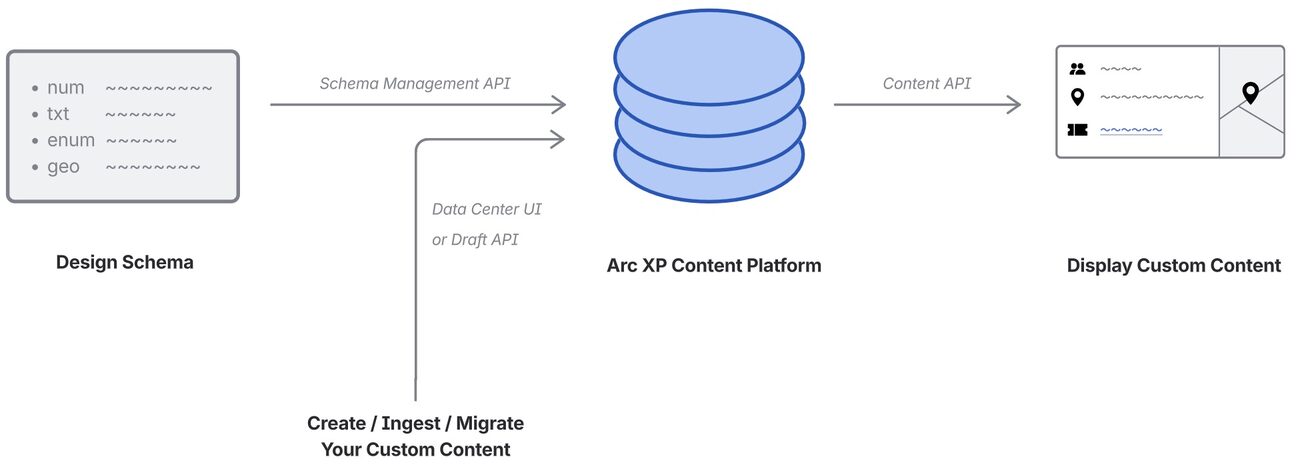
SCT has two layers: schemas and records.
1. Define a schema
A schema is the template for a content type. You give it a name (for example, “Events”) and add the fields it contains. Each field has a name, a data type (text, date, number, boolean, etc.), and optional search indexing settings.
Schemas are defined and managed in the Data Manager Schema Manager (admins) or via the Draft API.
Plan your schema before creating records
Once a schema is created, field types cannot be changed and fields cannot be removed. You can always add new fields, update display names, and update descriptions. See the Developer Guide for the full list of what can and cannot be changed.
See How to create Custom (Structured) Content in Arc XP to learn more about creating schemas.
2. Create records
Once a schema exists, editors create and manage records through the Data Manager interface: one per event, recipe, person, or place. Records can also be created and updated via the Draft API for bulk or automated ingestion.
3. Query and display
Records are available through the Arc XP Content API. Developers filter, sort, and search using indexed fields, then wire records into PageBuilder blocks to power the experience on the site.
See How to query (search) structured content records via the Content API for examples.
Also see How to Embed Structured Content Records in PageBuilder to learn more about how to display your custom content on your site.
Availability
Structured Content Types is available to all Arc XP customers with an active CMS license. No separate activation is required.
Up to 1,000 schemas and 200 fields per schema are enabled by default. All customers get 25 searchable (indexed) fields included. Additional searchable field capacity is available as a paid add-on.
Structured Content Types is not available as a standalone product. An active Arc XP CMS license is required.
For getting access, and user permissions needed see Getting Access to Structured Content UI and APIs guide.
Pricing
Every Arc XP customer gets the following at no additional cost:
| What’s included | Amount |
|---|---|
| Schemas | 1,000 |
| Fields per schema | 200 |
| Searchable (indexed) fields (per org) | 25 (distributed across all schemas) |
You can create up to 1,000 schemas with up to 200 fields each at no cost. The only paid add-on is additional searchable (indexed) field capacity.
When you hit your searchable field limit, the API returns an error on searchable field create operations.
For pricing and to purchase additional searchable field capacity beyond the included 25, contact your account team.
Structured content records count toward your total Arc XP document storage volume. Contact your account team for document volume pricing details.
FAQs
Is SCT included with my Arc XP license? Yes. All Arc XP customers get up to 1,000 schemas, 200 fields per schema, and 25 searchable (indexed) fields as part of the core platform at no extra charge.
Is there a limit on how many schemas I can create? You can create up to 1,000 schemas with up to 200 fields each. The only paid capacity limit is on searchable (indexed) fields: 25 are included, and additional capacity can be purchased.
Can I change a schema after I’ve created records? You can add new fields, update display names, and update descriptions at any time. You cannot remove fields or change a field’s data type. Plan your schema structure before loading real data.
How do structured content records affect my document storage? Each structured record counts toward your total Arc XP document volume. Factor expected record volume into your document storage projections.
How do I create a schema? Admins can create and manage schemas in the Schema Manager of the Data Center app in Arc Admin, or via the Draft API.
Who can see, manage Custom Content in my org?
Access is controlled by Data Center permissions (Read, Write, Admin) for editorial users; developer tokens use the standard Draft API and Content API permissions. See Getting Access to Structured Content UI and APIs guide to learn more.
What’s the difference between searchable and non-searchable fields? Fields indexed for retrieval are queryable via the Content API; fields indexed for editorial search are searchable within Data Manager. Non-searchable fields are stored and displayed but cannot be used in search or filter queries. Your org has a shared searchable field capacity that applies across all schemas.
What happens if I hit my searchable field limit? The API returns an error when you try to mark a field as searchable beyond your org’s capacity. Contact Arc XP Customer Support. Your TAM will coordinate additional searchable field capacity.
Does SCT work for headless or API-only implementations? Yes. Schemas and records can be managed entirely through the Draft API for management. For content retrieval, use the Content API.