

Content Caching In PageBuilder Engine
import ContentToggle from “/src/components/starlight/ContentToggle.astro”;
PageBuilder Engine caches content that is fetched server-side to improve site performance, reliability, and stability. Caching is enabled by default but can be configured to fit the specific needs of the content source. This guide focused on PageBuilder cache, while there are other key layers of cache at Arc within the overall caching strategy. Read Caching In Arc to learn more.
The following diagram illustrates how PageBuilder Engine fetches, caches, and serves/uses content.
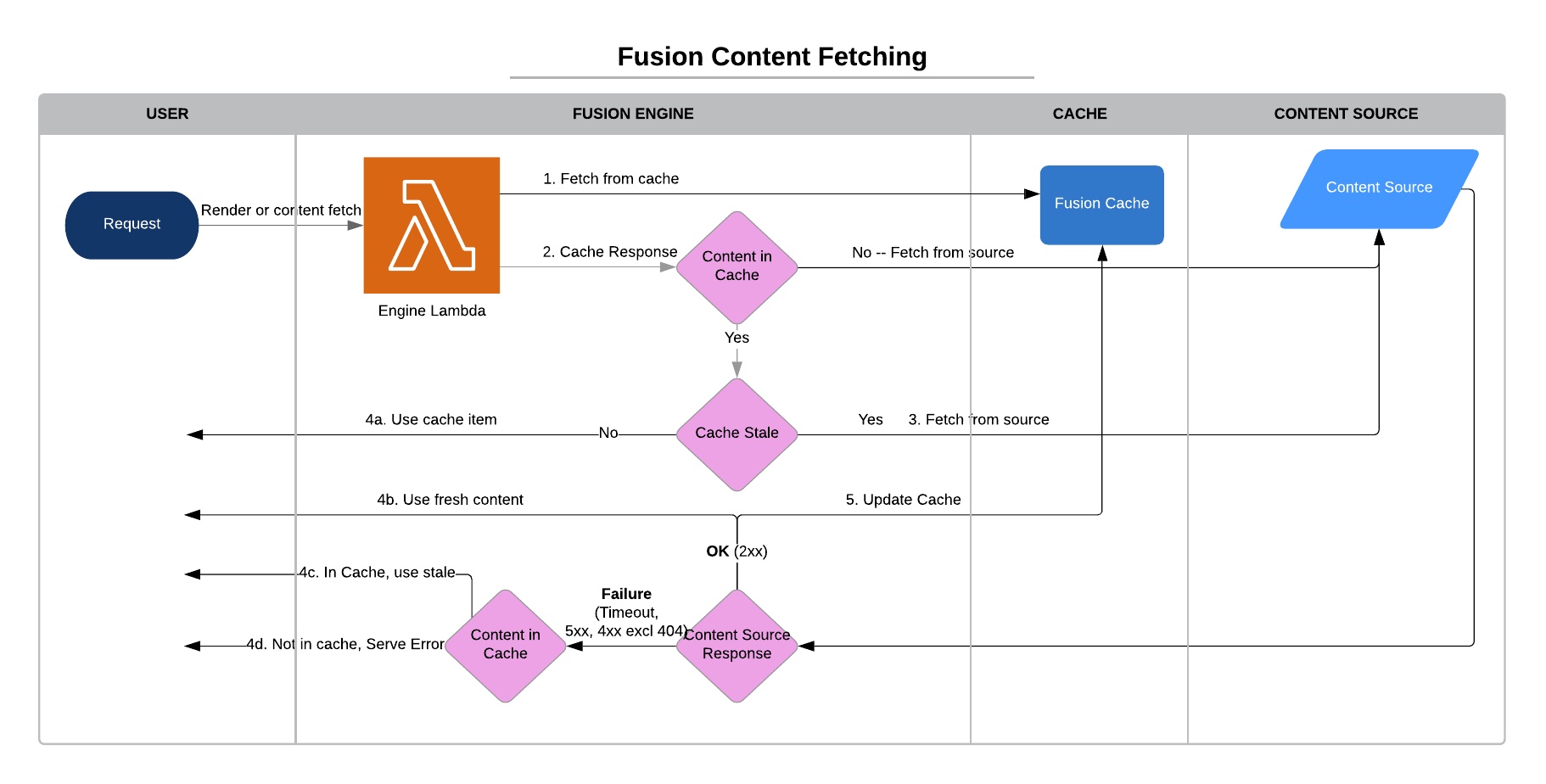
Several important conditions and settings control how PageBuilder Engine serves content. This document will guide you through features available to fine-tune content source cache configuration. Specifically, we will discuss the content source properties serveStaleCache and `back off’ in depth.
Understanding cache keys
Content sources are built to be re-used from different templates, features with different input parameters. Their responses get cached by what their input parameters are. These inputs get serialized into a cache key which is how PageBuilder checks if a content source was executed recently and it has a valid cache. In content sources cache keys get generated slightly differently by how your developers implemented resolve or fetch methods.
Resolve Content Source For a resolve content source, the cache key is generated using the returned string from the resolve function. This means that you can have the same cache serving multiple content sources within a deployment. It also means that you could have the same cache across deployments.
Fetch Content Source For a fetch content source, the cache key is generated using the content source name and the parameters it is called with. This means that you will not have the same cache for multiple content sources. The cache could still be used across deployments if the calling parameters and the source name remain the same.
Fetch provides more flexibility to developers to create more complex content fetching strategies but a key detail to be aware about using fetch is that the response returned from fetch method needs to be plain JSON objects. Any non-JSON objects will not be cached by the Engine cache.
When yor content sources won’t get cached?
PageBuilder Engine content source cache supports data elements up to 1 MB in size. The data is compressed before the size is calculated. Only the data returned from the fetch or resolve function is cached. The filter and transform functions are applied afterwards and the resulting data from those functions are not cached.
If your data size is larger than 1 MB, caching will fail. If the returned data is greater than 6 MB, that can cause the content source to fail. If the content source is being used as global content, that will cause your page to error. This is most frequently seen when querying large numbers of articles in a feed without filtering (using _sourceInclude or _sourceExclude) any of the data.
For a resolve content source, any response with a 2xx status code is considered a success and will be cached. For a fetch content source, any promise that resolves is considered a success and will be cached. If the content source fails (non 2xx status code for resolve and a rejected promise for fetch), PageBuilder Engine will check if there is a status code on the error. If there is, and the status code is between 300-307 or 404, the cache for the content source will be cleared (using the generated cache key for the request).
PageBuilder Engine tags rendered output with the content id from your global content. When you set up a resolver, you configure the template and the content source that will be used as global content when a URL matches with that resolver configuration and the template gets rendered. It’s important to note that the _id key and value in the response object is used for tagging your render output and this tag is how cache clear happens when your content is updated. Make sure you don’t remove the _id from your global content source response.
Incorrect Usage
Other examples of this are newsletter subscribe/unsubscribe, stories near a longitude/latitude point (note that stories in city or state would be fine), and identity or commerce services. All of these should call a non-Engine endpoint on the client side only.
Example
import axios from 'axios';import { NEWSLETTER_URL, API_SECRET } from 'fusion:environment';
const fetch = ({ userId = '' }) => axios({  method: 'GET',  url: `${NEWSLETTER_URL}?userId=${userId}`,  headers: {    'content-type': 'application/json',    Authorization: `Bearer ${API_SECRET}`  }}).then(({ data }) => data);
export default { fetch, params: { userId: 'text' }};A common example of this is when an article content source calls site service to get section information. This results in a call to site service for each article as opposed to one call to site service for each section. The correct way to do this would be to have a second content source for site service that a feature can call when it needs the section information.
Incorrect Example
import axios from 'axios';import { CONTENT_BASE, ARC_ACCESS_TOKEN } from 'fusion:environment';
const fetch = async ({ url, 'arc-site': arcSite }) => {  // get the article  const { data: articleData } = await axios({    method: 'GET',    url: `${CONTENT_BASE}/content/v4/?website=${arcSite}&website_url=${url}`,    headers: {      'content-type': 'application/json',      Authorization: `Bearer ${ARC_ACCESS_TOKEN}`    }  });  // get the most recent data for the primary section  const { data: sectionData } = await axios({    method: 'GET',    url: `${CONTENT_BASE}/site/v3/website/${arcSite}/section?_id=${articleData.taxonomy.primary_site._id}`,    headers: {      'content-type': 'application/json',      Authorization: `Bearer ${ARC_ACCESS_TOKEN}`    }  });  return {    articleData,    sectionData  }};
export default {  fetch,  params: {    url: 'text'  }};
Fixed Example
// Article Content Source (Global Content)const resolve = ({ url, 'arc-site': arcSite }) => `/content/v4/?website=${arcSite}&website_url=${url}`;
export default {  resolve,  params: {    url: 'text'  }};
// Site Service Content Sourceconst resolve = async ({ id, 'arc-site': arcSite }) => `/site/v3/website/${arcSite}/section?_id=${id}`;
export default {  resolve,  params: {    id: 'text'  }};
// Feature Codeconst { globalContent: articleData } = useFusionContext();const sectionData = useContent({  source: 'site-service',  query: { id: articleData.taxonomy.primary_site._id }});const data = {  articleData,  sectionData};
Valid Example There are valid use cases for multiple calls with a fetch content source. An example would be if you have a content source that needed to get the section information and a collection associated with that section. As long as you had a one-to-one mapping of sections to collections, you would not make duplicate calls.
import axios from 'axios';import { CONTENT_BASE, ARC_ACCESS_TOKEN } from 'fusion:environment';
const fetch = async ({ id, 'arc-site': arcSite }) => {  // get the section  const { data: sectionData } = await axios({    method: 'GET',    url: `${CONTENT_BASE}/site/v3/website/${arcSite}/section?_id=${id}`,    headers: {      'content-type': 'application/json',      Authorization: `Bearer ${ARC_ACCESS_TOKEN}`    }  });  // get articles from the collection  const { data: collectionData } = await axios({    method: 'GET',    url: `${CONTENT_BASE}/content/v4/collections?website=${arcSite}&content_alias=${sectionData.custom.collection}`,    headers: {      'content-type': 'application/json',      Authorization: `Bearer ${ARC_ACCESS_TOKEN}`    }  });  return {    sectionData,    collectionData  }};
export default { fetch, params: { id: 'text' }};This is most frequently seen when a fetch function directly returns the Promise from a library (like Axios) instead of extracting the JSON response data from it.
Incorrect Example
import axios from 'axios';import { CONTENT_BASE, ARC_ACCESS_TOKEN } from 'fusion:environment';
const fetch = ({ id, 'arc-site': arcSite }) => axios({  method: 'GET',  url: `${CONTENT_BASE}/site/v3/website/${arcSite}/section?_id=${id}`,  headers: {    'content-type': 'application/json',    Authorization: `Bearer ${ARC_ACCESS_TOKEN}`  }});
export default {  fetch,  params: {    id: 'text'  }};
Fixed Example
import axios from 'axios';import { CONTENT_BASE, ARC_ACCESS_TOKEN } from 'fusion:environment';
const fetch = ({ id, 'arc-site': arcSite }) => axios({  method: 'GET',  url: `${CONTENT_BASE}/site/v3/website/${arcSite}/section?_id=${id}`,  headers: {    'content-type': 'application/json',    Authorization: `Bearer ${ARC_ACCESS_TOKEN}`  }}).then(({ data }) => data);
export default { fetch, params: { id: 'text' }};Let’s look at the last example if you implement your custom error handling logic to your network library. After you handle your error, make sure you continue to throw either a new error or the error you captured from your fetch code. If you just return the error object, it will be treated as same with a success response since the error object can be serialized to JSON without an issue. Your error object can contain sensitive information like request body/headers that gets serialized by the Engine and gets returned as HTTP 200 response code. This will not be cached by the Engine but it will be cached at the CDN layer and may be served as stale content for up to 72 hours. If you don’t have the need to do handling errors, you can just not catch and let it be caught by the Engine that will be handled properly.
Incorrect Example
import axios from 'axios';import { CONTENT_BASE, ARC_ACCESS_TOKEN } from 'fusion:environment';
const fetch = ({ id, 'arc-site': arcSite }) => axios({  method: 'GET',  url: `${CONTENT_BASE}/site/v3/website/${arcSite}/section?_id=${id}`,  headers: {    'content-type': 'application/json',    Authorization: `Bearer ${ARC_ACCESS_TOKEN}`  }}).then(({ data }) => data).catch((err) => {    // handle your error (i.e: log)    return err});
export default {  fetch,  params: {    id: 'text'  }};
Fixed Example
import axios from 'axios';import { CONTENT_BASE, ARC_ACCESS_TOKEN } from 'fusion:environment';
const fetch = ({ id, 'arc-site': arcSite }) => axios({  method: 'GET',  url: `${CONTENT_BASE}/site/v3/website/${arcSite}/section?_id=${id}`,  headers: {    'content-type': 'application/json',    Authorization: `Bearer ${ARC_ACCESS_TOKEN}`  }}).then(({ data }) => data).catch((err) => {    // handle your error (i.e: log)    throw err    // or throw new Error("Something went wrong")});
export default {  fetch,  params: {    id: 'text'  }};
What Happens When Caching Fails
PageBuilder is architected to be an independent system that is not fully reliant on the stability of the content systems that it uses to populate content into the pages it renders. This is a powerful feature of PageBuilder that also needs to be considered by developers who build websites on the platform. To ensure website stability if a content source encounters transient failures (due to services being down or rate limited), PageBuilder Engine Serve Stale And Backoff will allow your site to continue to function by using stale versions of the service’s objects that previously returned successfully. However, if a content source is used incorrectly (as described earlier), and there are issues with the services it is calling, then caching for that content source will have a higher probability of failing due to PageBuilder Engine being less likely to have fall back objects in cache. This means many requests will generate a new call to the endpoints the content source was proxying. For PageBuilder Engine, this is normally Content API. For a site with a reasonable number of readers, this will quickly consume your Content API rate limit, resulting in stale content being served across your site. Additionally, if you have a large number of concurrent requests, this could cause your site to completely stop rendering new content/editorial changes.
Rate Limit and Throttling
If caching is for some reason disabled and failing, and the page starts being hammered with requests, PageBuilder Engine will eventually enforce a rate limit to prevent the system from being overwhelmed. During a rate limit event, any requests to the content source will return a 429 - PageBuilder Engine will attempt to serve stale.
Serve Stale
Serve stale improves site stability when PageBuilder Engine cannot refresh expired cache content due to upstream content source issues. With serve stale enabled, if PageBuilder Engine receives a 4xx (except 404) or 5xx HTTP status when attempting to refresh an expired cache item, PageBuilder Engine will use/return the stale cache item instead of serving the error to allow the site to continue rendering. PageBuilder Engine will continue to attempt to update the cache during subsequent requests for that content item for a period of up to 72 hours. See the content source Spec for more information.
Usage
Serve stale is enabled by default and can be configured within your content sources by defining the serveStaleCache attribute.
Example:
export default { resolve (query) { return 'http://content-source-mock:8080/content' }, serveStaleCache: [true (default)| false]}By default, serve stale is enabled for all content sources. There are few cases where serve stale should be disabled, but it can be done so by specifying ‘false’
When should I use Serve Stale behavior?
Any content source — whether provided by Arc, an external third-party, or custom-written by you — has the potential to fail. These failures can occur for several reasons, including a spike in traffic, a failure of an underlying resource such as a database, or even a simple coding error. When these failures occur, Serve Stale allows your PageBuilder features to continue serving the last successfully retrieved content. This means affected pages and templates can continue to show something rather than nothing.
Serve Stale is recommended in cases where:
- Up-to-the-minute accuracy is not required
- Showing empty content or hiding a feature is unacceptable
- A content source is known to have performance or stability concerns
We’ve found that for most normal web content, Serve Stale’s benefits are significant and contribute to improved site reliability and stability for readers.
Backoff Behavior
PageBuilder Engine content fetching backoff is a means to reduce the number of upstream calls to refresh a content cache item particularly during upstream content source outage. It works, in addition, to serve stale and only on items previously cached. If PageBuilder Engine receives a status code that would cause a serve stale, it will backoff from further content fetches for a configurable interval of time. This reduces excessive calls to an upstream content source during error and unnecessary requests by PageBuilder Engine which will further improve overall site stability. See the content source Spec for more information.
Usage
Backoff is enabled by default and can be configured within your content sources by configuring the backoff attribute.
Example:
export default { resolve (query) { return 'http://content-source-mock:8080/content' }, backoff: { enabled: [true (default)| false], strategy: [simple (default)| exponential], interval: [backoff interval in minutes. Minimum is 2 minutes] }}The timeline figure below further illustrate the effects and benefits of backoff: when PageBuilder Engine fetches content, when it serves stale, and how the time interval affects it all.
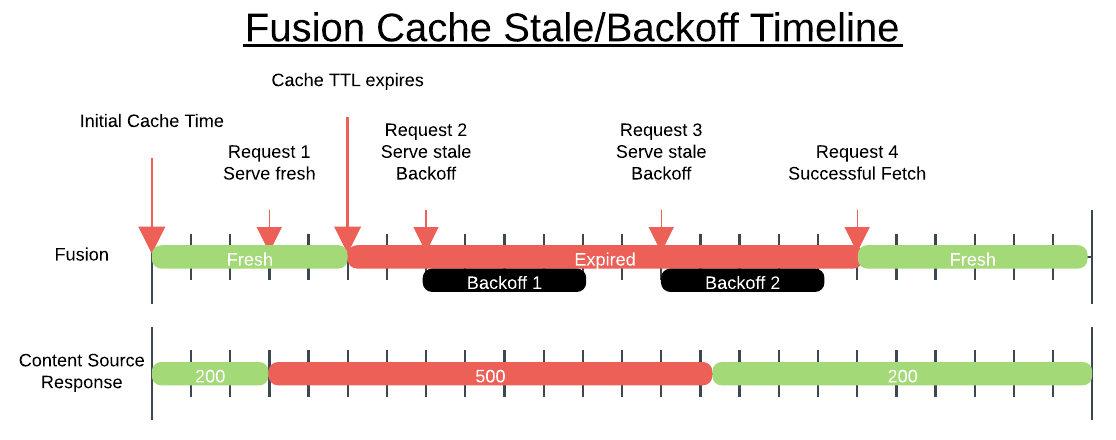
When should I use Backoff?
When a content source is in a failed state, often the worst thing you can do is to immediately retry the request. These retries can quickly pile up and overwhelm the failed content source, making recovery take longer than it would otherwise. In these cases, backoff helps alleviate load on failing content sources by throttling the rate at which PageBuilder Engine attempts to fetch the content again.
We recommend using backoff in almost all cases when Serve Stale is also enabled. Disabling Backoff may be appropriate in cases where you expect content sources to fail and recover rapdily, regardless of traffic from PageBuilder Engine.
Unless a content source is vital to a feature rendering and it would be preferred to continue attempting repeated requests to the content source, backoff should always be enabled.
When should I use the simple vs exponential backoff strategy?
Both backoff strategies will reduce potential load during times of error and both are provided for fine-grained control over the backoff process. As a rule of thumb, the exponential backoff is the preferred and best strategy to allow backend content sources to recover. With the exponential backoff strategy, the backoff window interval grows and allows a gradual spread of different content source requests over time, thereby alleviating network congestion, connection errors or load errors that may be occurring.
Partial Caching
A content source can handle complex designs that may pull 10 different data sources together into a single content output for the feature code to ingest and render to build rich experiences. But as the amount of API calls made from a content source increases, its execution time also increases. Not every data set needs to be pulled at the same time. Especially if they are not expected to update frequently. Or the APIs used for these endpoints may have lower rate limits that we don’t want to set the TTL for a content source long just because one of the dependent APIs rate limits are low.
Client developers can wrap one, or more fetch into a partial caching method cachedCall, to get PageBuilder Engine to cache specific parts of your content source cached with its own TTLs. A content source can be partially cached in any way client developers want. The content source cache will still be executed but clients can utilize partial cache to optimize content source performance, split its contents into sharable cache objects across content sources. This means, different content sources can cache their common parts and execute more efficiently if they use same 3rd party data source with same parameters.
See Partial Caching documentation to learn more about this feature.
Further notes: cache clearing and debugging
It is important to note that PageBuilder Engine’s serveStale and backoff features will only be effective towards items that have been previously cached under successful circumstances. If an upstream content source is failing, any queries to it that have not been previously cached by PageBuilder Engine will also fail. Only those previously cached queries will be able to serve stale.