

How to Set up Vindicia Integration
Arc XP Subscriptions offers built-in integration with Vindicia Retain as an additional step to collect payments for failed renewal attempts and retain subscribers. Vindicia provides the final step in capturing payments when traditional Dunning logic fails and no future attempts would be made. More details on Vindicia’s data analysis and recovery methods are available at their site here.
Prerequisites
- An active Vindicia account. The Arc XP Subscriptions team can facilitate establishing one.
- Smart Dunning must be enabled — Vindicia cannot be used with Basic Dunning.
- Arc XP will enable Vindicia as part of your Smart Dunning settings once your Vindicia account is active.
Add a “Send to Vindicia” rule
Sending a failed subscription payment to Vindicia is similar to setting up a Smart Dunning rule.
- In your Smart Dunning settings, add a new rule and choose Send to Vindicia.
- Select the number of days after the initial renewal payment attempt for the subscription to be sent to Vindicia.
- Set the Number of Days Duration — the number of days Arc XP will wait for Vindicia to respond.
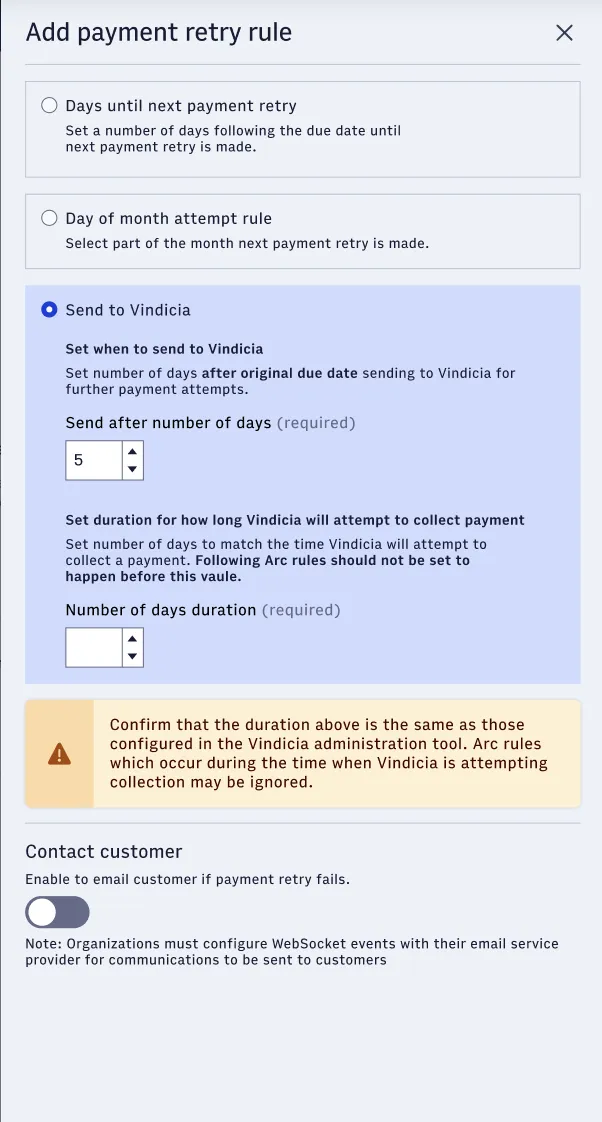
The “Send to Vindicia” rule configuration: choose the delay before sending, then the duration Arc XP waits for a Vindicia response.
Vindicia rules will supersede any other rules. If there are payment retry rules that overlap with a subscription being held with Vindicia then those retry attempts will not be made by Arc XP.
Reporting
Arc XP will populate the financial reports with the expected payments made by Vindicia. This is based on the payment request that is sent to Vindicia, but Arc XP does not receive the transaction details from the payment gateway through Vindicia. It is expected that Vindicia has processed the payment as sent; if they incorrectly report a successful transaction or process a different amount, that will not be reflected in the financial transaction reporting. There will be a record in the subscription activity extract noting “Active by Vindicia.”
Tax
Tax details for a successful Vindicia transaction will be populated in the Arc XP custom tax calculator and the Taxamo integration.
Refunds
Events, Status, and Reporting
All Dunning events generate a WebSocket event which can be used to queue up Dunning emails or other messaging. See the FAIL_RENEW_SUBSCRIPTION event for details on the fail-to-renew subscription event.
Following a failed renewal payment retry attempt a subscription will go into Suspended, Dunning, or Terminated status. Suspended status is used when a subscription failed when Basic Dunning is turned on; Dunning will be the status when Smart Dunning is enabled. If the subscription is marked as Terminated, the reason will be noted as failed to pay. If the subscription is Suspended or Dunning, the customer can later reactivate their subscription by paying the subscription. If the retry attempt is successful, a RENEW_SUBSCRIPTION event is sent.
The Subscription Summary report offers a breakdown of subscriptions by status.