

Set up Content Recommendations end to end: block, content ingest, and API access
This guide walks you through everything needed to run Content Recommendations on your own Arc XP organization, end to end:
- Add the recommendations block to a PageBuilder page so a personalized reel renders for your readers.
- Feed your content catalog into the recommender through the IFX content-ingest bundle.
- Verify API access to the Recommendations API, including authentication and browser CORS.
It ties together the block integration with the parts of the platform documented elsewhere, and links out to those references rather than repeating them.
Overview
Content Recommendations has three moving parts:
- Recommendations API — a browser-direct, read-only API. You call it with an
X-Api-Keyheader and it returns a ranked list of items, each carrying a display-readycardobject. - Collector API — a server-side ingest API. Your CMS sends content and behavioral events to it. For Arc XP CMS customers, content ingest is handled by the IFX bundle.
- The block renders the reel; the IFX bundle keeps the catalog in sync.
The data flows in one direction:
graph LR
A[Composer story events] —> B[IFX bundle]
B —> C[Collector API]
C —> D[(Catalog + model)]
D —> E[Recommendations API]
E —> F[Recommendations block]
Both APIs are served from the same host:
https://<org>-config-prod.api.arc-cdn.net/Replace <org> with your organization identifier. The middle segment config is literal, and prod is fixed. The path prefix selects the backend: /recommend/v1 for the Recommendations API and /collector/v1 for the Collector API.
For the full API contract, see the Content Recommendations API Developer Guide and the API Reference.
Prerequisites
Before you start, make sure you have:
-
Content Recommendations enabled for your organization. If it is not, contact Arc XP Customer Support.
-
A Developer (admin) token from Developer Center, used to call the Delivery API and the IFX Admin API.
-
Two headless API tokens (
X-Api-Key), each assigned to its own key collection so a token exposed in one context cannot be used against the other API:- one assigned to the recommend collection (used by the block, in the browser),
- one assigned to the collector collection (used by the IFX bundle, server-side only).
Follow Provisioning tokens through Delivery API to generate and assign them.
-
A GitHub personal access token with
read:packagesscope — only needed to build the IFX bundle, whose SDK is published to GitHub Packages. -
Roles: PageBuilder admin (to place the block and set site properties) and IFX admin (to install the integration).
Part A — Add the recommendations block
The block renders the personalized reel. It reads your recommend key and site identifiers from PageBuilder site properties, calls the Recommendations API directly from the browser, and maps each returned card onto a story card.
Step 1 — Add the reference block to your theme
- Clone the recipe from arc-fy-recommendations-ui-recipe and copy the recommendations feature block into your theme’s blocks.
- Deploy your theme so the block is available in PageBuilder.
- In PageBuilder, edit the page or template where the reel should appear.
- Add the Recommendations feature block (labeled Recommendations – Arc Block in the block picker) to the layout.
- Save the page as a draft — you will publish it after configuring the properties below.
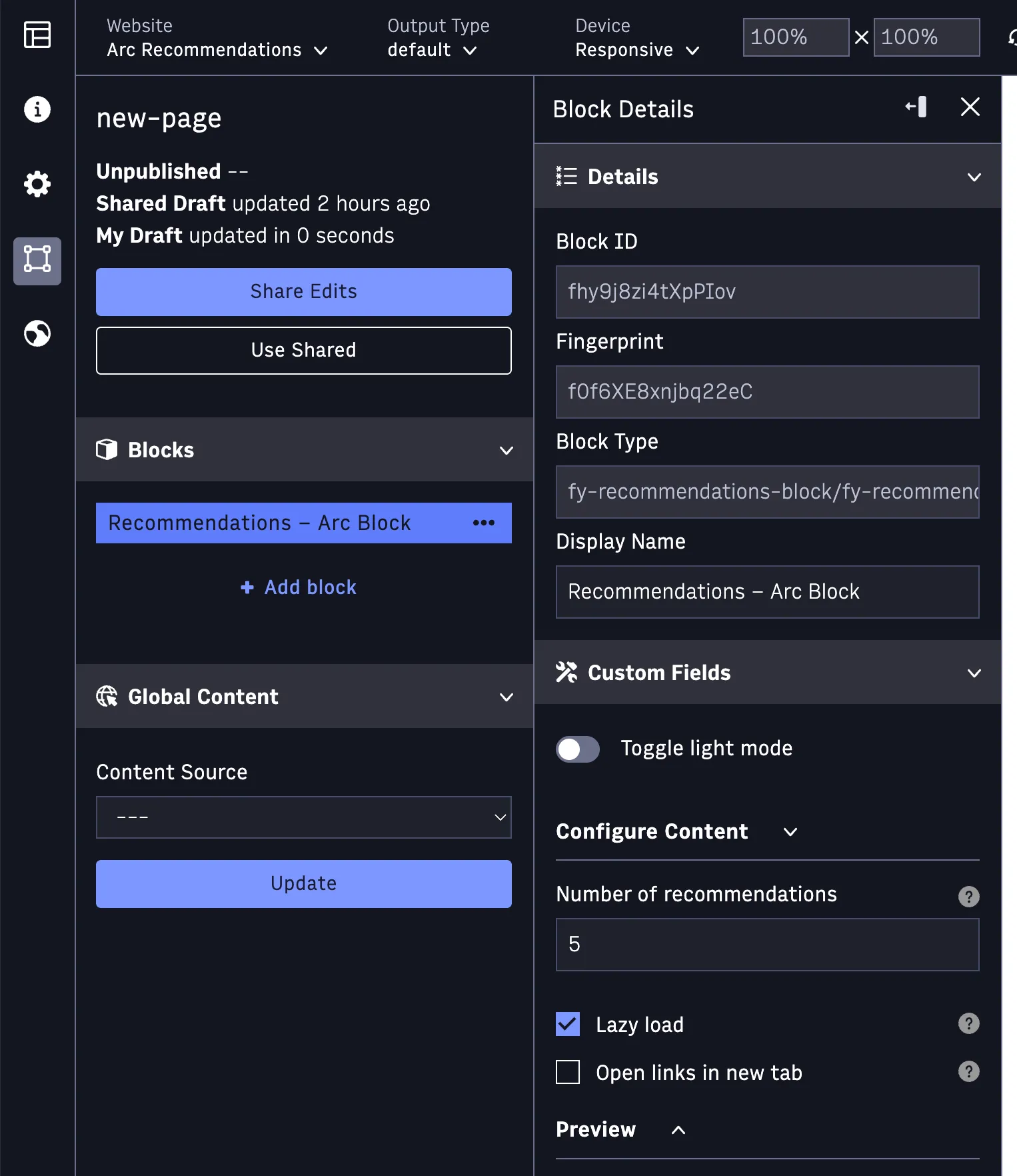
Step 2 — Set the block custom fields
The block exposes these custom fields in the PageBuilder editor:
| Custom field | Purpose | Example |
|---|---|---|
displayAmount | Number of recommendations to request and render (1–50). | 10 |
lazyLoad | Defer fetching until the block scrolls into view. | true |
openInNewTab | Open recommended items in a new browser tab. | false |
previewMode | Editor-only preview. When on, the carousel renders sample data (or recommendations for Preview User ID) so you can see the layout while composing. Off by default. | false |
previewUserId | Editor-only. With Preview Mode on, preview recommendations for this user id; leave empty to preview sample data. | (empty) |
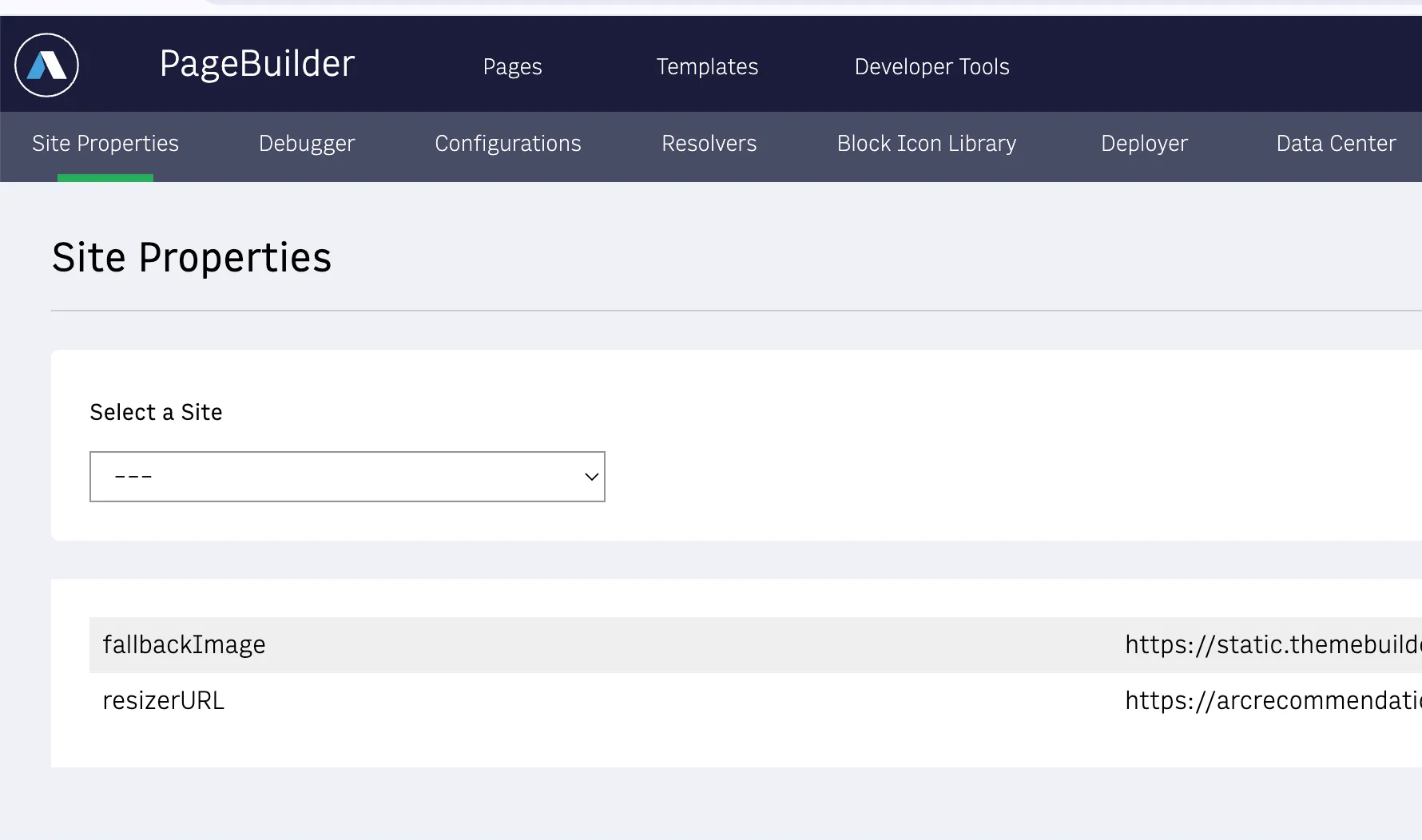
Step 3 — Set the site properties
The block reads three site properties from your PageBuilder site configuration. Set these per deployment in the PageBuilder admin:
| Property | Purpose | Example |
|---|---|---|
fyRecommenderOrg | Your organization identifier. Derives the API host <org>-config-prod.api.arc-cdn.net. | <org> |
fyRecommenderSite | The recommender site_id (the catalog partition key). | <site_id> |
fyRecommenderApiKey | The headless X-Api-Key assigned to the recommend collection. | <headless-key> |
Step 4 — Provide a stable user ID
The Recommendations API requires a user_id for every request. The block reads a stable per-visitor identifier from fy_user_id (cookie or localStorage). If it is absent, the block cannot request personalized results.
- For logged-in readers, set
fy_user_idto your anonymized, stable user identifier. - For anonymous readers, generate a stable ephemeral ID once and persist it, so the same visitor produces the same
user_idacross sessions.
When your properties are set and the block has a user_id, publish the page. The block renders the reel once the API returns items.
For a framework-agnostic view of how the returned card maps onto a story card (empty and error states included), see Rendering Recommendations: From Content IDs to Story Cards.
Part B — Feed your content through IFX
The block can only render what the recommender knows about. The IFX content-ingest bundle subscribes to Composer story events and forwards each story to the Collector API, keeping your catalog in sync automatically.
This section summarizes the install; the Content Recommendations IFX Handlers Guide is the authoritative reference for the bundle’s handlers, router, and environment variables.
What the bundle ingests
The bundle maps each story event to a collector action:
| Story event(s) | Collector action |
|---|---|
story:create, story:first-publish, story:republish, story:update | upsert (publish) |
story:unpublish | delete |
story:delete | delete |
Environment variables
Set these as integration secrets. See the Handlers Guide for the complete table and defaults.
| Variable | Value | Notes |
|---|---|---|
FY_COLLECTOR_BASE_URL | https://<org>-config-prod.api.arc-cdn.net | Host only — no /collector/v1; the client appends the content path. |
FY_COLLECTOR_PAT | <headless-key> | The key assigned to the collector collection. Sent as X-Api-Key. Server-side only. |
FY_SITE_ID | <site_id> | The recommender site_id (see the Part A caution). Keeps ingest and reads on the same partition. |
LOG_LEVEL | info | Optional. Pino log level. |
GITHUB_TOKEN | <github-pat> | Build-time only — pulls the IFX SDK from GitHub Packages. Not read at runtime. |
Install paths
You can install the bundle two ways — pick one.
Path 1 — Developer Center UI (recommended for most)
- Create a new integration in Developer Center.
- Upload the bundle zip.
- Set the environment variables above as integration secrets.
- Subscribe to the story events listed above.
- Deploy and promote the bundle to live.
Path 2 — IFX Admin API (scriptable)
Call the IFX Admin API with Authorization: Bearer <developer-token>. The ordered calls are:
POST /admin/integrationwith{ integrationName, description, email }— creates the integration and an auto-generated starter bundle you then replace.POST /admin/bundles/{name}— multipart upload of your bundle zip.POST /admin/bundles/{name}/deploy/{bundleName}— asynchronous; poll until deployed.POST /admin/bundles/{name}/promote/{version}— asynchronous; wait for the bundle to go live.POST /admin/secret?integrationName={name}— once per environment variable.POST /admin/events/subscriptions— once per story event, after the bundle is live.
Part C — Verify API access
Run these checks to confirm the recommend key, CORS, and ingest are working.
1. Authentication check (server-side)
Confirm your recommend key is accepted and returns results:
curl -i -H "X-Api-Key: <headless-key>" \ "https://<org>-config-prod.api.arc-cdn.net/recommend/v1/recommendations?site_id=<site_id>&user_id=test-user&num_results=5"Expected results:
200with arecommendationsarray. On a cold catalog the array may be empty — that is still success.401/403→ the key is missing or not assigned to the recommend collection. Re-check the assignment step in the token-provisioning guide.422→ a required query parameter (site_idoruser_id) is missing.
2. CORS preflight check (browser-direct)
The block calls the API from the browser, so the preflight must succeed for your origin:
curl -i -X OPTIONS \ -H "Origin: https://<your-site-origin>" \ -H "Access-Control-Request-Method: GET" \ -H "Access-Control-Request-Headers: x-api-key" \ "https://<org>-config-prod.api.arc-cdn.net/recommend/v1/recommendations"Expected: 200 (or 204) with access-control-allow-origin for your origin, access-control-allow-methods: GET, OPTIONS, and access-control-allow-headers including X-Api-Key.
If the allow headers are missing, your origin is not in the API’s allowed origins.
3. Collector ingest check (server-side)
Publish a test story in Composer (against your test site_id), then confirm:
- The IFX integration logs a
202 Acceptedfrom the collector. - The item appears in the recommend response for
<site_id>(repeat check #1).
4. In-browser check
Load the page with the block and confirm the reel renders for a visitor with a valid user_id.
FAQs
Why do I get a 200 but an empty list?
Cold start. The model needs a populated catalog and a meaningful behavioral signal before it returns ranked items. See the Onboarding Checklist for how to warm it up.
Why is my site_id different from my website ID?
The recommender partitions the catalog on its own site_id, which is often <org>-site rather than your Arc website ID (arcSite). Set fyRecommenderSite (block) and FY_SITE_ID (IFX) to the recommender site_id so reads and ingest share one partition.
Why does a card have no image?
The item has no thumbnail in its card. The block renders a placeholder in that case. Make sure your published content carries a lead image so the ingest maps a thumbnail.
Which key goes where — recommend or collector?
The recommend key goes in the block (browser) and is public. The collector key goes only in the server-side IFX bundle and must never reach the browser.
The preflight returns 403 from the edge — who fixes it?
CORS origins are provisioned at the platform edge. If your origin is not allowed and you cannot self-serve it, contact Arc XP Customer Support with the exact origin you need allowed.