

Continuity of publishing in a global outage
When a primary cloud provider like AWS experiences an outage, Arc XP powered sites typically remain online thanks to Arc XP CDN caching and resiliency layers, so your reader experience does not get impacted. However, editorial teams may temporarily lose the ability to publish updates, often at the moment those updates matter most.
This guide provides a practical, preconfigured “insurance policy” that allows publishers to continue updating reader-facing content during a global outage, without relying on backend systems or new engineering work.
How It Works
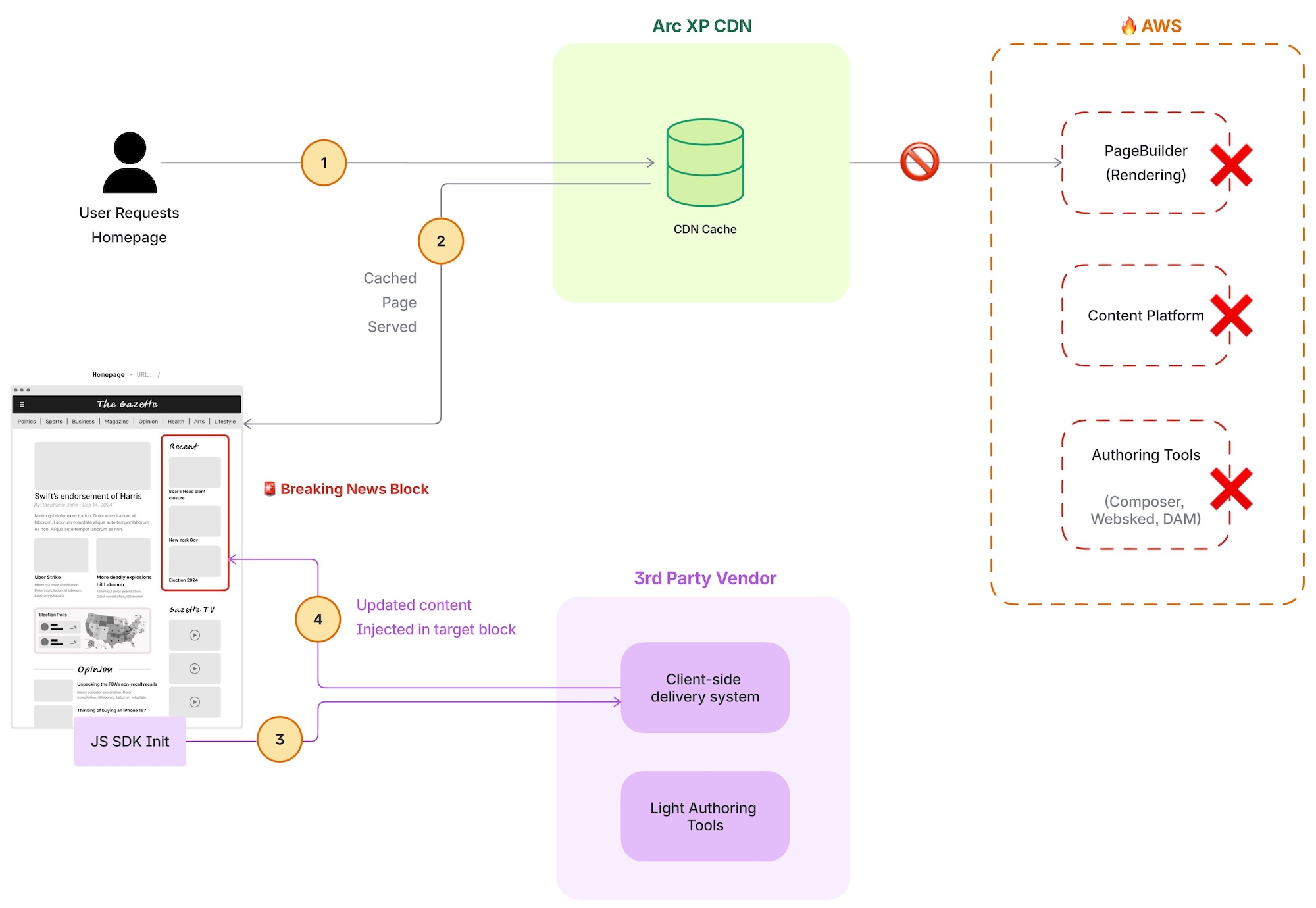
At a high level:
- User requests a page when a global AWS outage happens
- Pages continue to load from CDN cache.
- A client-side JavaScript SDK loads in the browser.
- Editors use a third-party tool to publish content changes.
- The SDK patches the DOM after page load to display updated content to readers.
This approach requires no backend availability and no Arc XP content authoring services.
How about new story detail pages?
-
Full Story Generation by Vendor
- System must accept full story content from the vendor (e.g., text + metadata).
- Vendor should provide a canonical URL for each story.
-
Story Hosting & Subdomain Setup
- Configure a dedicated subdomain for vendor-provided story pages (e.g., breaking.abcd.com).
- DNS + SSL must be provisioned for this subdomain at initial setup.
-
Content Delivery & Availability During Outages
- Ensure story pages are served independently of the ArcXP origin during AWS outages.
- Use a vendor CDN or static export to guarantee uptime if main AWS services are down.
-
URL Integration into Main Site
- Homepage and feed components should reference and link to vendor story URLs.
- Cards/snippets should include headline, summary, timestamp, and destination URL.
-
Card Feed Configuration
- Card feeds must support external links (open vendor URLs).
- Include fallback behavior (e.g., placeholder content) if story URL is unreachable.
-
Metadata & SEO Requirements
- Vendor story pages must include proper title tags, meta descriptions, and structured data.
- Open Graph / social metadata for sharing should be included.
-
Error / Fallback UX
- Display a friendly message on story detail pages if vendor content fails to load.
-
After outage
- Republish stories on arcXP and set a redirect from temple URLs
Limitations / assumptions
-
Vendor resiliency
Global outage might be happening in vendors technology solutions too (they maybe also down). -
Not full editorial workflow, lightweight publishing capacity
(i.e: WebSked, editorial controls might not be in effect). This is an emergency system. -
Human readers, and web only Client-side updates may not be visible to bots, crawlers, or SEO systems.
Non web channels, like mobile apps, OTT apps, feeds/integrations with other systems (i.e: print, newsletter) is not covered by this solution. -
Non-cached pages
Infrequently accessed content that is not in cache, will not load to readers.
Set up
Step 1: Set up the vendor account
Step 2: Set up their client-side integration (SDK) in your output type or page
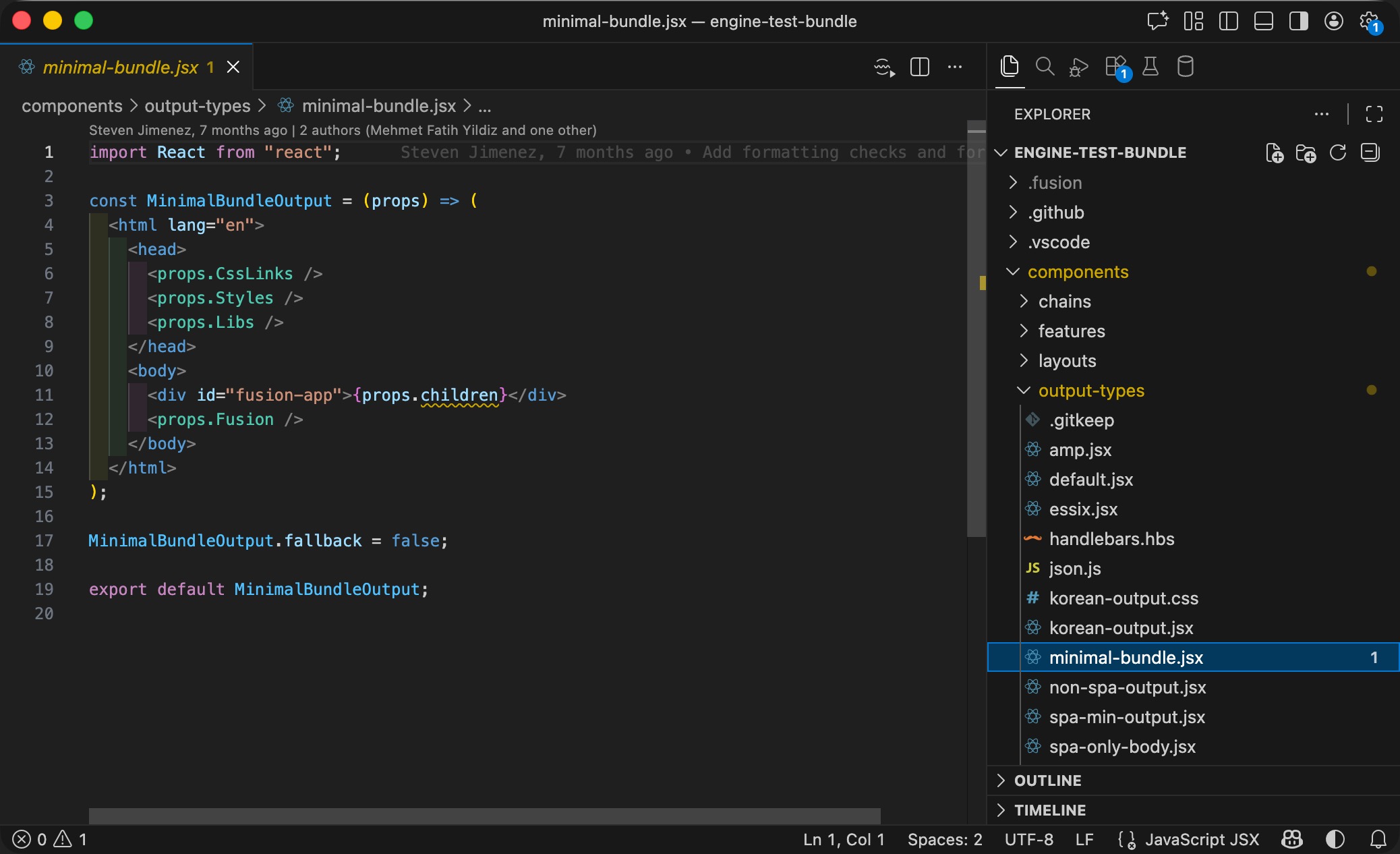
Option 1: Set client-side JS SDK on all pages
Output types are your top-level HTML skeletons where you can place your 3rd party javascript integrations here. Generally default output type powers all pages (unless you configured your pages differently).
Option 2: Set client-side JS SDK on a select pages (i.e: homepage-only) [No-code change option]
This approach can be done from PageBuilder Editor curation UI, if you have Raw HTML block in your bundle.
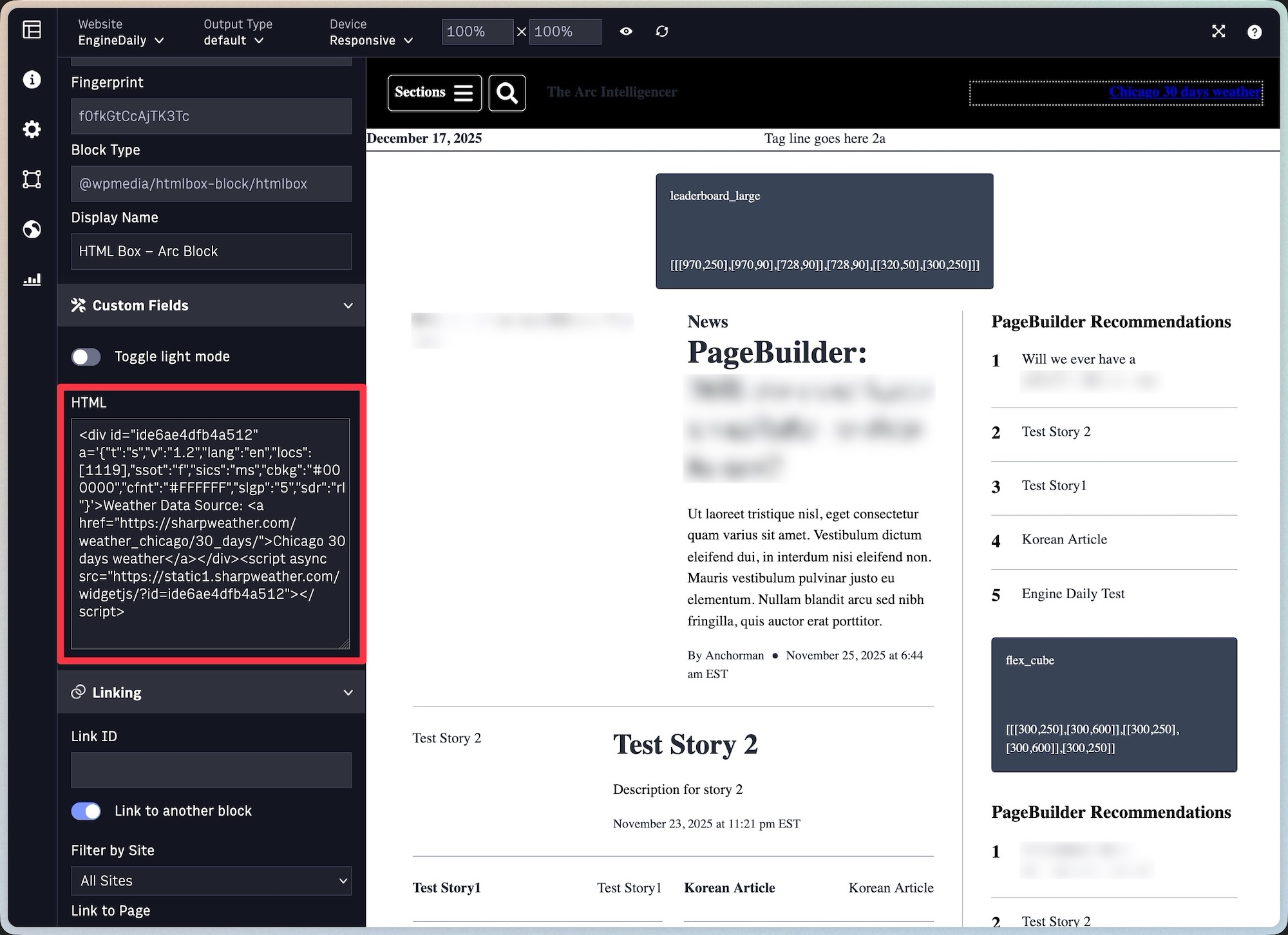
Where the JS SDK places does not matter, as long as the 3rd party vendor has ability to freely select target HTML elements and have ability to manipulate them. This is a common functionality found in most web-experimentation tools.
If a point solution like Live Blogging vendor to be used; the JS code position may matter. Refer to the chosen vendors implementation guides for how to set their client-side logic properly.
This approach also makes sense to keep the vendor costs in control (If vendor charges for pages their integrations loads on; only pay for page views/user etc for the pages you care and implement - i.e: homepage)
Step3: Test, and use vendors content editing and publishing tools to update content
How to evaluate an outage-ready solution
Arc XP does not recommend specific vendors. Customers should evaluate solutions based on their ability to operate during a primary cloud provider outage and their fit with editorial workflows under pressure.
When exploring vendor options, focus on the questions below.
Cloud independence
- Which cloud provider does the solution run on?
- If AWS is unavailable, will publishing still work?
- Are core services dependent on AWS in any way?
- How is traffic handled during a regional or global outage?
The solution must remain reachable and usable even when AWS and Arc XP backend services are down.
Editorial workflow fit
- Can editors publish updates without engineering help?
- How fast can changes be made and published?
- Does the UI match newsroom expectations during breaking news?
- Can content be prepared or staged in advance?
This is an emergency tool. It should be easy and familiar.
Client-side control
- Can changes be limited to specific pages?
- Can updates be disabled quickly after recovery?
- Does the solution avoid unnecessary performance impact?
FAQs
-
Is this a replacement for Arc XP publishing?
- No. This is an emergency-only fallback for reader-facing updates and does not replace Arc XP’s authoring, workflows, or publishing systems.
-
When should we use this approach?
- During AWS outages or major degradations when publishing tools are unavailable and timely updates are still required (e.g., breaking news, alerts).
-
Will this work if Arc XP APIs or PageBuilder are down?
- Yes. Once published and cached, the client-side JavaScript runs entirely in the browser and does not depend on Arc XP backend services at runtime.
-
Will readers see the updates immediately?
- Yes for most users. Updates are applied after page load; some users may briefly see the cached version before the change appears.
-
Will bots or search engines see these updates?
- No. Client-side DOM updates are intended for human readers and may not be indexed or reflected by crawlers. Most crawlers don’t process javascript.
-
Does this impact SEO?
- This approach should not be used for SEO-driven updates. It is designed for reader communication, not search indexing.
-
What happens when AWS services are restored?
- Editors should publish the canonical content through Arc XP, then disable or remove the client-side changes through the vendor.
-
Does this introduce security risks?
- Risk is low when vendors are properly vetted and scripts are limited to specific pages. Editorial access should be tightly controlled.
-
Will this affect page performance?
- There is typically a small overhead from loading a client-side SDK. You can limit usage to critical pages to minimize impact.
-
Do we need engineering support?
- Light setup support may be needed initially. During outages, updates are intended to be editor-driven using WYSIWYG tools.
-
What if the third-party vendor is also down?
- This is a valid risk. Choose vendors with strong global infrastructure and treat this as risk mitigation, not a guarantee.
-
Can we prepare content in advance?
- Yes, and it is recommended. Pre-staging headlines, banners, or emergency messages reduces risk during live incidents.
-
Is Arc XP endorsing these vendors?
- No. This guide provides examples and guidance; vendor selection and support remain the customer’s responsibility.