

Arc XP Subscriptions - How to Use Blueconic CDP with ArcXP Paywall
BlueConic CDP Connector with Arc XP Paywall
We provide an integration with BlueConic and the Arc XP Paywall. Soon this integration will use the CDP Connector functionality providing clients all the new options and configurations.
By leveraging both BlueConic and Arc XP Subscriptions, you can ensure that each step of your member journey is powered by market leading platforms and supported by experienced teams who understand what it takes to support projects like yours. BlueConic’s customer data insights integrate seamlessly with Arc XP Subscriptions products management and access filters, to give you control of your audience engagement.
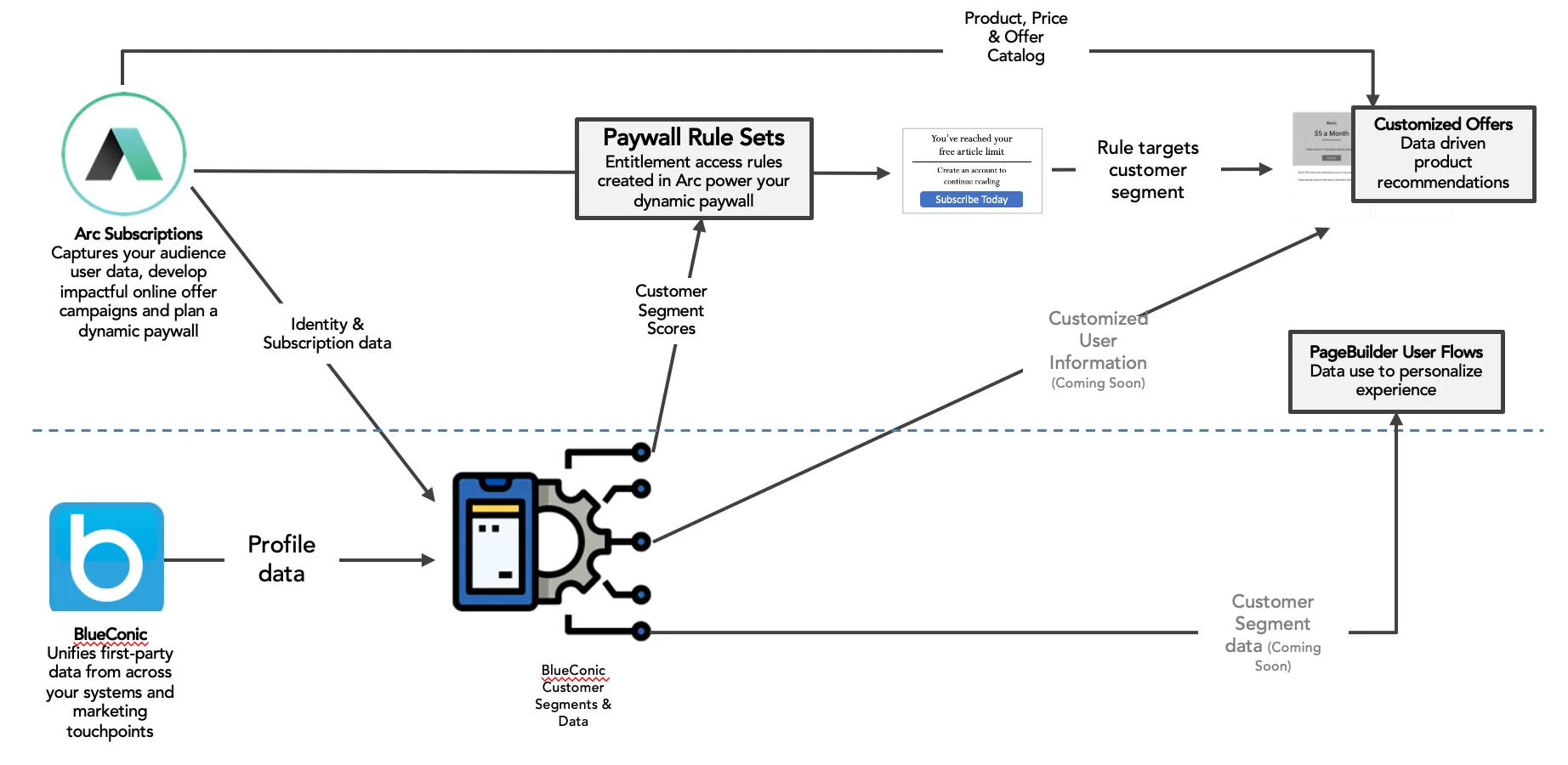
Arc XP Subscriptions:
- Connect and develop your audience, dynamically meter content, & sell products online
- Gives you tools necessary to build a testing culture & with first-class integrations
BlueConic:
- Enables marketing team to unify its first party data into granular, person-level profiles to power its segmentation and messaging efforts
- World’s leading CDP
Adding BlueConic Segments to Paywall Rules in Arc XP Subscriptions
Segments can be used to classify our visitors (known and anonymous users) in various groups. These segments are set up based on the visitor’s profile or behavior, which can be monitored over time. The segmentation is dynamic, based on the latest profile property values.
Depending on the segments setup and the features of each profile, each user could fall into several segments. For example, a single user might be included in the segments “under 35 years old”, “Preferred visit hour: Morning” and “interested in politics”.
Step 1: The segments should be created in the BlueConic account. These segments are based on the client’s targets.
To create a segment, you will need to start by selecting the conditions customers have to meet to be part of the segment. These conditions could be profile properties (e.g. gender, interest, visit time, etc), extend existing segments, or objectives. Some documentation about how to create Segments in Blueconic:
For example, different segments can be created to meter users according to preferred visit hours. The client could define different segments.
Selecting for each one of these segments, “visit time” as the condition, and the visit hours to meter the users falling in each segment.
Step 2: Once the segments have been created into the Blueconic account, one or several segments can be attached to the rules enabled in the paywall.
Go to the Paywall tab, and into the rules tab select Blueconic as ’Content Criteria’ in ‘Audience Criteria’. Finally, choose one or several segments, those created in the Blueconic account.
Local Storage
Each time a user falls in the site, if the paywall is enabled for that site, some user information will be loaded and stored in the Local storage.
BlueconicEnabled is a boolean flag which will be set to true, if the paywall has at least one blueconic segment set as an audience criteria on one or more rules (see Step 2). If Blueconic is enabled in the Paywall, additional user Blueconic information will be provided in the local storage.
Since the paywall script uses localStorage to store the user state, once a user lands in the site, if BlueconicEnabled is true, Blueconic script is loaded via p.js and it allows us to gather segment data for that particular profile, using their JS API. If that user’s blueconic profile is part of any blueconic segments, those segments are added to the bc array.
//Local StorageBCSessionID: 33dd3ddc-9451-4983-8d16-7afc5c3e5ae5ArcP: { bc: [ //blueconic segment(s) in which the user’s blueconic profile is falling 0: "All Visitors" 1: "frequency" 2: "Preferred visit hour: Afternoon" 3: "Engagement: High" ] c: "story" ... }Browsing data is tracked under a Blueconic profile (BCSessionID). Thus, a new Blueconic profile is created each time an anonymous session is initialized. An anonymous session is initialized each time a no logged user just landed on the site, a user is logout or the user session expires. This is explained below:
- User X visits the site, he/she is anonymous and is browsing articles. User X data stored on BC profile A.
- User X logs in and he/she is still on BC profile A.
- User X logs out. Now, he/she is an anonymous user. Then, a new Blueconic profile is created (BC Profile B).
- User Y is anonymous and he/she is browsing articles on BC profile B. User Y logs in and is still on BC profile B.
- User Y session expires. Thus, a new Blueconic profile is created (BC profile C).
- User X visits site is anonymous and he/she is browsing articles. User X is on profile C.
Note: In the scenario described before, user X’s blueconic data will be stored on multiple profiles (A & C Blueconic Profiles). In order to avoid multiple Blueconic profiles for the same user, the client could implement a merge strategy in the Blueconic tool, using a listener to store a unique id for a user as a new profile property (ex: uuid) and a merging rule in settings, to ensure that arc identity users have one Blueconic profile
Data published to Blueconic via Blueconic SDK
Paywall-client is where we gather information on the user from the browser, page, and entitlements. All of this info populates the _facts object. It is in _facts where interactions and profiles are loaded and controlled to pass to Blueconic. For more information, see JavaScript Front-End API.
The code below is our implementation of Blueconic in paywall-client side
//If Blueconic is enabledif (window && bcEnabled) { window.addEventListener('load', () => { if ( typeof window.blueConicClient !== 'undefined' && typeof window.blueConicClient.event !== 'undefined' && typeof window.blueConicClient.event.subscribe !== 'undefined' // Blueconic is loaded ) { return; } else { // Loading Blueconic const bcHostname = 'arcpublishing.sb.blueconic.net'; let bcScript = document.createElement('script'); bcScript.async = true; bcScript.src = 'https://' + bcHostname + '/frontend/static/javascript/blueconic/blueconic.min.js'; ( document.getElementsByTagName('head')[0] || document.getElementsByTagName('body')[0] ).appendChild(bcScript); } }); window.addEventListener('ArcSDK.logout', () => { if (window.blueConicClient && window.blueConicClient.profile) { window.blueConicClient.profile.createProfile(); } });}Since we are creating new Blueconic Profiles each time an anonymous session is initialized. We are also checking the username and jwt to determine the logged in status and whether or not we need to create a new profile.
Additional BlueConic resources: