
The audience most likely to pay you already has
Your most dependable growth is already sitting in the audience you have. A visitor who trusted you enough to pay once knows your product and has shown they will pay for it, which makes them far easier and less expensive to win again than someone brand new. That advantage only grows over time, since across major markets about one in six people pay for online news and that share has held flat, so starting from a cold audience keeps getting slower and more expensive.[1]
In 2026, publishers have been leaning into exactly this. More than three quarters of commercial publishers named paid content their main revenue focus for the year, ahead of advertising and events.[2] The clearest path to growth runs through the relationships you have already earned.
Whether it is a visitor ready to come back or a subscriber ready for more, you can make it easy for them to act.
Win them back, or upgrade them
The first is the visitor who used to pay and drifted away. Subscriber churn runs at around 4% a month across news brands, and it compounds.[3] Over time that builds a sizable audience of people who already know your product and have paid for it before, which makes them some of the most winnable audience you have.
The second is the subscriber who is still with you and ready for more. Someone who already subscribes has shown they value what you publish, so they are a natural audience for a larger package. Subscribers who move onto richer bundles tend to stay longer and spend more, which makes upgrading current subscribers a dependable way to grow revenue.
Both run into the same friction. When a lapsed visitor decides to come back, or a current subscriber decides to add more, you usually send them to a checkout form to enter a card they have used before. Take that step away and you let them say yes right when they already want to.
A smoother path for the audience you already know
When someone subscribes with you, setting up a payment method is part of signing up. So a visitor who comes back after a lapse, or a subscriber who decides to add more, has already done the tedious part. They stay in control the whole way. They see the offer, choose to act, and confirm with a single tap on a card they have used with you before, which spares them from retyping details they have already trusted you with.
Arc XP makes that saved card available through the cards-on-file API. For a signed-in visitor, it returns the cards they have on file with you, each with an internal identifier and enough detail to recognize which card it is.
[ { "id": 88213347, "type": "Visa", "lastFour": "1111", "expiration": "12/27" }]You never handle the raw card number. You get an internal id, the card brand, the last four digits, and the expiration, which is everything you need to show a visitor that a saved card is ready and then charge it by reference.
A card is on file because the visitor bought something at some point, so these flows apply to people who have paid you before. Whether that visitor is now lapsed or still active decides which API you reach for.
Win back a lapsed visitor in one click
Start with the lapsed visitor. Publishers are leaning harder into keeping and re-earning the audience they already have, rather than counting on a steady supply of brand new ones.[1] Someone who paid before already knows your product, which makes them some of the most winnable audience you have, and when they decide to come back, a full checkout is the last thing that should stand between them and a restart.
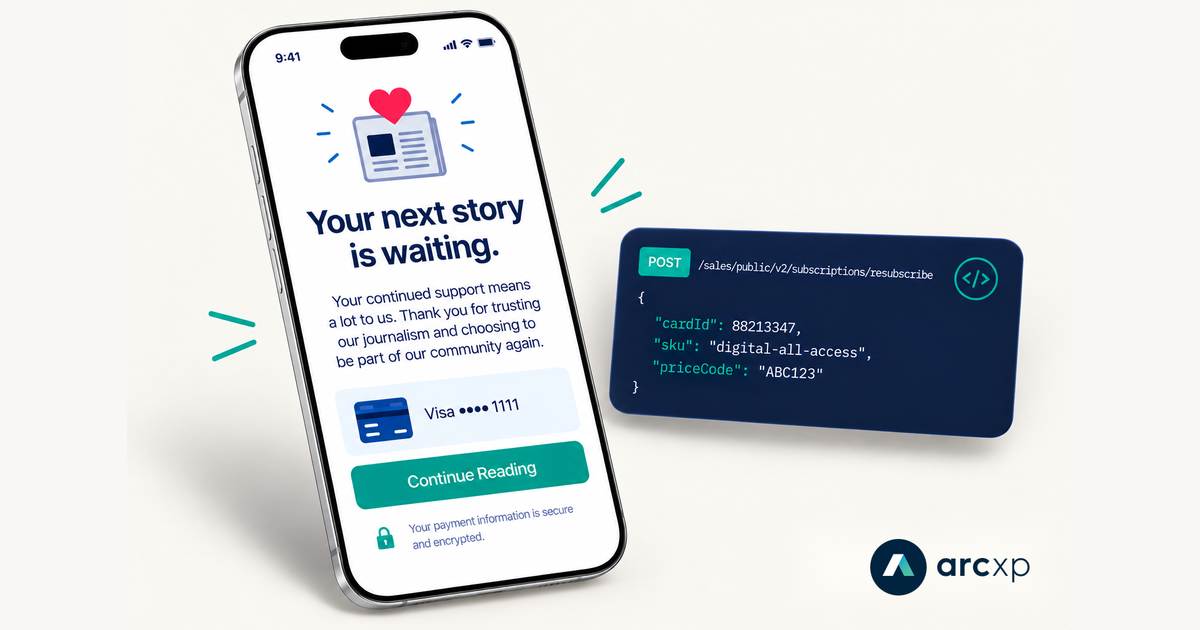
With a card on file you can offer a single button. The visitor confirms, and you call the resubscribe API (POST /sales/public/v2/subscriptions/resubscribe) with the saved card, the product they are returning to, and its price code.
{ "cardId": 88213347, "sku": "digital-all-access", "priceCode": "ABC123"}Resubscribe always creates a new subscription for that visitor on the saved card, and it is meant for someone who does not currently have one. If someone is still subscribed and you want to give them more, the upgrade path handles that.
We miss you
Come back for $9.99 a month and pick up right where you left off.
- GET
/sales/public/v2/subscriptions/cards-on-fileLook up the visitor's saved card - POST
/sales/public/v2/subscriptions/resubscribeCharge the saved card and start a new subscription
For the full build, including how to read a visitor’s saved cards, present the button, and handle errors, follow the resubscribe how-to guide.
Upgrade an existing subscriber without starting over
Now the subscriber who is still with you. Say they subscribe to your games or puzzles product, and a bundle that adds your news coverage builds on what they already value.
Arc XP Subscriptions already has an upgrade API built for this. It allows a subscriber to upgrade to a bigger product with a single confirmation and no need to re-enter payment, since it uses the details already on their subscription. They stay on one subscription: their current term is credited and the new product starts right away, so they never end up with overlapping charges or separate renewal dates to track.
Subscribers who have a bundle subscription churn less and stay with you longer, which is what makes upgrading a current subscriber so valuable.[3] It works the same way as resubscribe, with no card to re-enter and no checkout to sit through, just a confirmation once the subscriber decides they want more.
Get the full story, too
You already subscribe to Games. Add unlimited access to our news for $5 more a month.
- POST
/sales/public/v1/subscription/upgradedowngradeInitialize the upgrade and preview the change for the subscriber - PUT
/sales/public/v1/subscription/upgradedowngradeFinalize: charge the difference and refund the rest of the term on the existing payment method
For the request and response details, along with the full set of upgrade, downgrade, and renewal options, see the user-facing APIs for subscription upgrades.
Get started
Arc XP Subscriptions provides the APIs behind these flows. You build the front end experience on top of them.
Which flow you use comes down to the visitor’s current status: resubscribe starts a fresh subscription for someone with no active one, and upgrade moves an active subscriber to a product with more to offer.
Resubscribe (no active subscription):
GET /sales/public/v2/subscriptions/cards-on-filereturns a signed-in visitor’s saved cards, each with an internal id, card brand, last four digits, and expiration.POST /sales/public/v2/subscriptions/resubscribecharges one of those saved cards to start a new subscription, taking the card id, the SKU, and the price code.
Upgrade (active subscription):
POST /sales/public/v1/subscription/upgradedowngradeinitializes an upgrade for an active subscriber and returns a proposal plus asessionId.PUT /sales/public/v1/subscription/upgradedowngradefinalizes the upgrade with thatsessionId, charging the difference and refunding the unused portion of the current term on the payment method already on the subscription.
For the win-back build, follow the resubscribe how-to guide. For upgrades, downgrades, and renewal changes, see the user-facing APIs for subscription upgrades.
The audience most likely to pay you already has. These two flows make it easy for them to do it again.